Thursday, 23 June 2016

7 Advanced Tactics Pro Facebook Marketers Use to Boost Conversions

It’s time for better results – more leads, more revenue – with Facebook ads.

Today, you’ll get 7 advanced tactics for Facebook ads.

These are the best of the best techniques I use to increase conversions for myself and my clients.

Before we dive in, there’s one essential piece of “pre-work” for you. To help you track sales and conversions, you’ll need to have the Facebook Pixel installed on your website as well as one of two methods of conversion tracking implemented.

Start with the Facebook Pixel

Facebook Pixel is just a bit of code (also known as a script) that you put on your website that sends messages back to Facebook for tracking purposes.

When you install the pixel, you’ll be able to retarget people who have visited your website, track events that happen on your website and attribute that activity directly to the specific ad that brought the website visitor to your site.

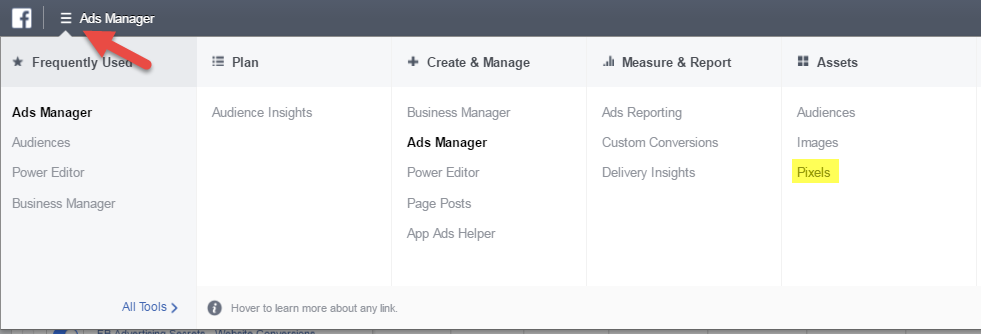
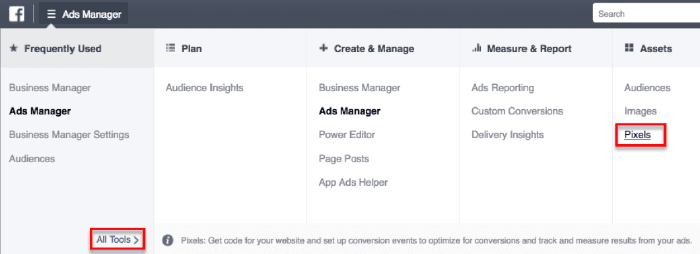
You can find your Facebook Pixel (unique to every ad account) in the Assets area.
I won’t rehash the step-by-step Facebook Pixel installation, but what you do need to know is how to then measure your conversions at every stage of your funnel. You can measure conversions on your site with either the Standard Event code or a Custom Conversion.

The Standard Event is an additional line of code you add to the base pixel code and place on the “thank you” page of your website (or the intermediary place in your funnel).

A Custom Conversion is a URL Rule that’s set up to indicate the desired action has been met. Each account is allowed 40 Custom Conversions.
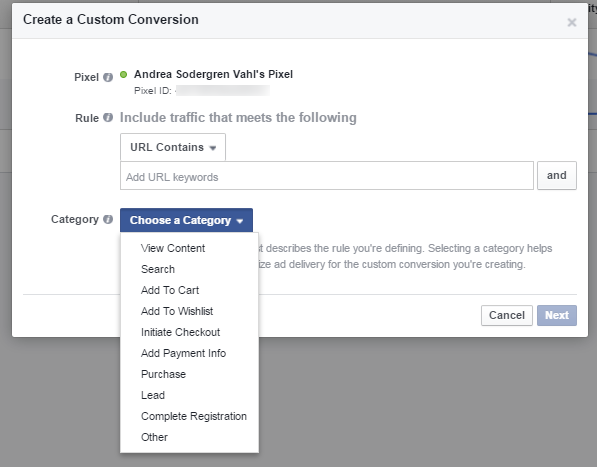
Make sure you have one of the measurement strategies in place before you place your ads. Once you have your tracking system, you’ll know how much it costs to get a lead, to get a sale, and to have other actions take place from each ad. Then you get to continue to test and run the ads that give you cheaper clicks, leads, and sales!

Now, on to the Advanced Facebook Ad Tactics…

#1 – Use Video Ads to Build Audiences

Video on Facebook. So hot right now.

Facebook is making a play for YouTube and giving preferential treatment to videos.

…So that’s one huge benefit to using videos in ads.

That said, the higher engagement video ads can create doesn’t always lead to the best cost per website click. So be sure you do your own tests to get the best results for you.

Using video also works well with one of the newest features of Facebook marketing—the ability to target people who have already engaged with your content. This feature is just rolling out and isn’t available to all marketers yet, but it should be coming soon if you don’t already have access.

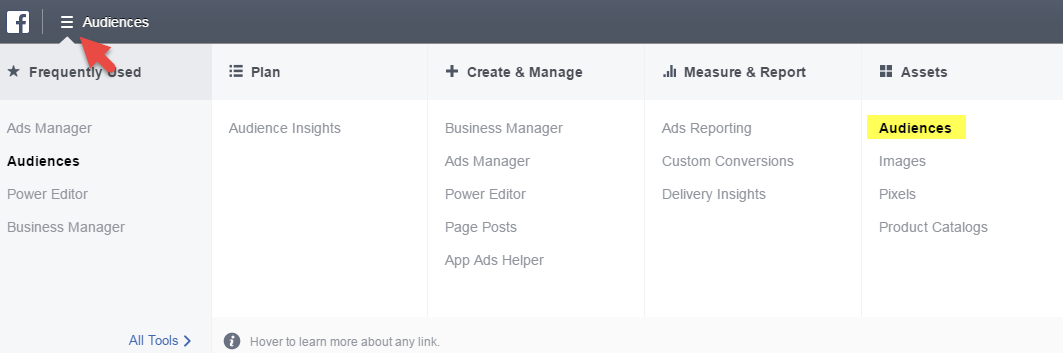
To use this feature, go to the menu in the upper left corner and select Audiences.
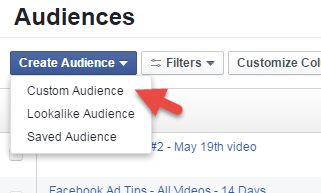
Then select Custom Audiences from the dropdown menu.
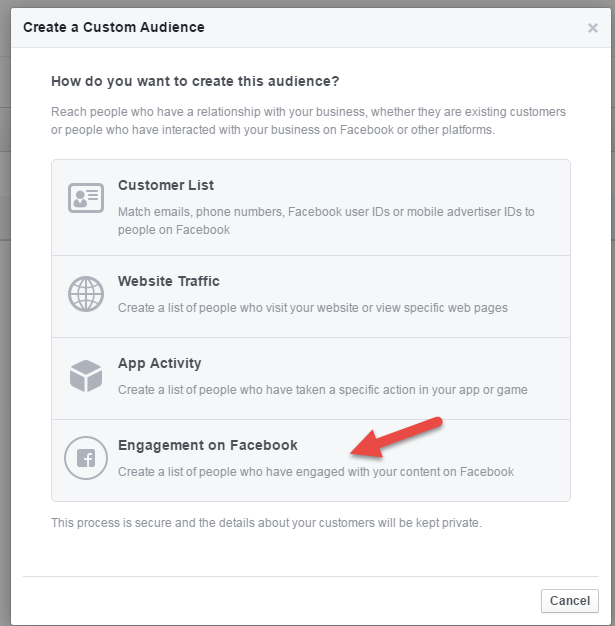
And then you can select Engagement on Facebook to create an audience of people who have already engaged with your videos in the past. 

(If you don’t see this option, this feature isn’t available to you yet, but it should be soon.)

You can choose the engagement level for your videos so you are targeting people who have watched a larger portion or a smaller portion of your video.
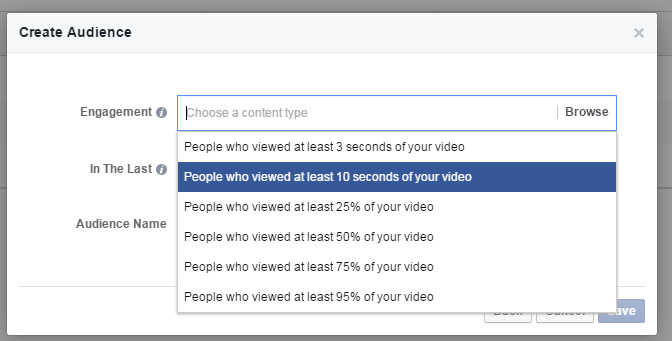
I prefer to go with at least 10 seconds so that you know a person is more engaged. One limitation is that the video needs to have a decent amount of views (over 1000) to retarget people who have watched it. As a general rule, you can’t target an audience size of less than 1000 with Facebook ads.

But with video views costing around $0.01 or $0.02 each, getting your initial video up to 1000 views will only cost you around $10-20 and possibly less depending on your audience. Plus, you can group a set of videos into one audience so you capture anyone who has seen your recent videos.
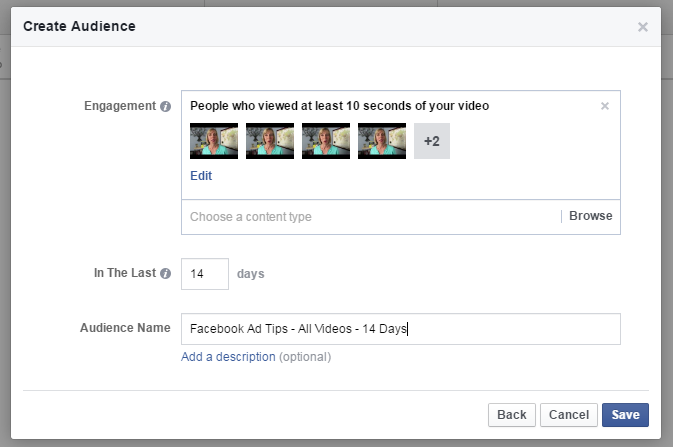
By creating an Audience of people who have already viewed your videos, you’ll be showing your ad to a warm audience who is familiar with your content.

#2 Sequence Your Messages

Another powerful technique that advanced marketers are using is message sequencing. This gives people a series of tips or directs them to different content based on how they interact with your first ad.

I used a combination of an ad with an image that went to a free mini-course then a series of 3 Video tips.
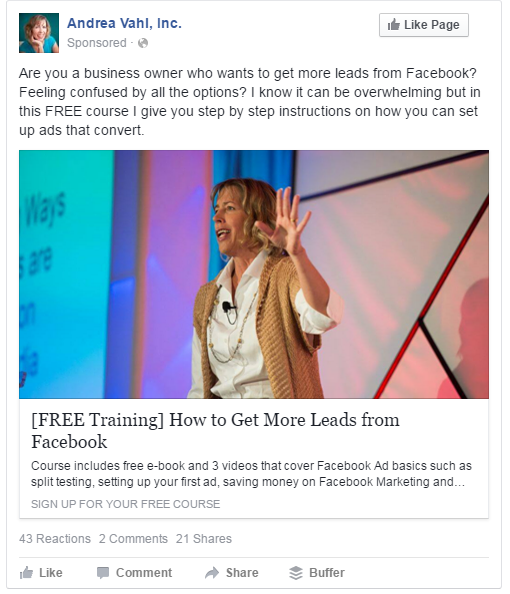
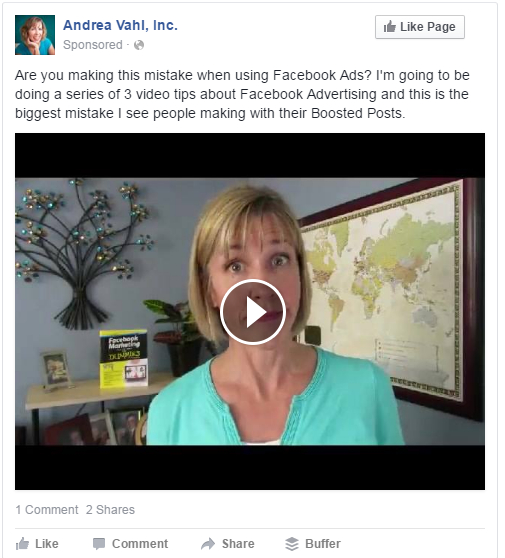
Then I scheduled the ads so that they would go to the same audiences, but I also used the Custom Audiences to re-target the people who had already seen my first Video tip and my second Video tip.
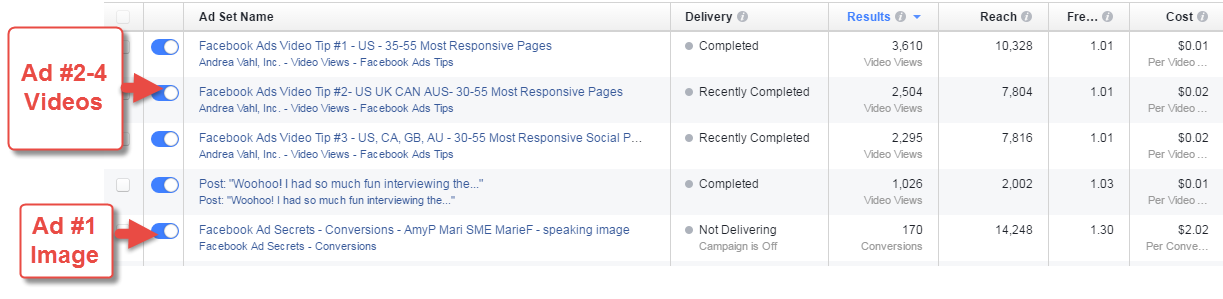
I ran ad #1 throughout the campaign but then sequenced the three Video Tip Ads to run 1 day each on sequential days.

You probably noticed that my retargeted video views were more expensive, but that’s because a very narrow audience costs more.

 

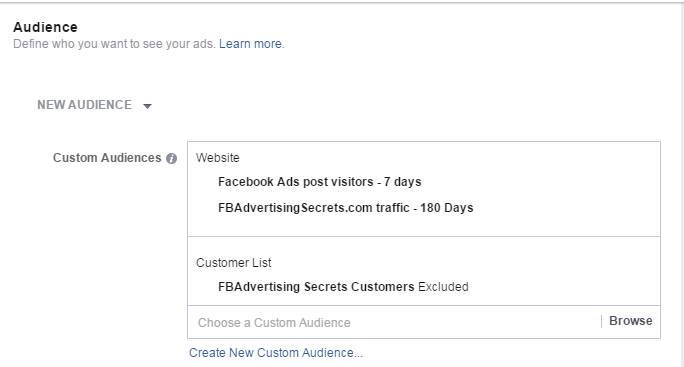
On the final day, I ran two ads that retargeted both people who had visited my website and the people who had seen any of my videos. What resulted from this sequenced campaign was an increase in sales of 350% over my last promotion just four months earlier!
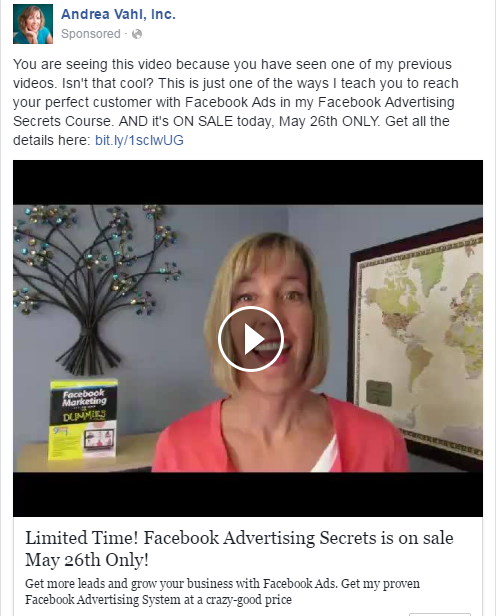
You can also do this sequencing slightly differently by directing people to content on your website, creating a custom audience of people who have visited that particular page on your website and then show them a different message.

Jon Loomer does this particularly well with a Carousel Ad with three different images, each leading to different “tests” on his website. When you select which type you are, he is then able to build a Custom Audience from your website visit and direct different type of content just to you.
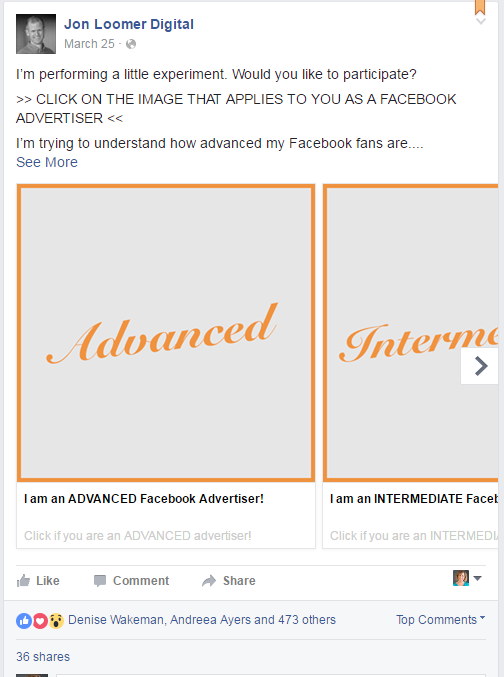
One limitation of this approach is that you will have to have over 1000 visitors to each page to then use that custom audience for additional advertising. So something to keep in mind!

#3 Only Sell to Warm Audiences

Selling on Facebook is challenging. It’s different than Google because people may not actively be looking for your solution. You are targeting by interests and demographics, not search terms that someone is looking for right in that moment.

Custom Audiences can be set up to connect to your email subscribers who have opted in on an offer, website visitors who have viewed particular pages, or people who have watched your videos. Doing so keeps your costs down by only showing your ads to people who are more likely to convert.
#4 Use Breakdown Reports to Spot Weaknesses

Many people aren’t using the Breakdown Report to see what segments are converting better for them. While we can’t see things like which keywords are converting best (separate those out into different Ad Sets if you want to compare that), you can break down results by Placement, Age, Gender, and even Time, as well as other segments.
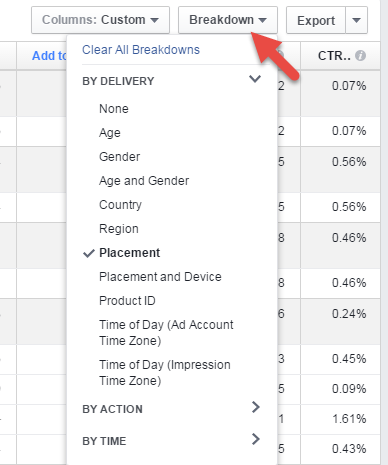
When you use the breakdown report, you can stop the underperforming segments. In this example, the Mobile News Feed placement is converting at a 26% better rate!

You can also separate out your placements into different Ad Sets so that those budgets are controlled more tightly. When you choose multiple placements in one ad, the budget is optimized across all of them and is not spread evenly.

Notice in this set of ads, the Right Column placement for retargeting does better in terms of cost per conversion compared to the News Feed on Desktop.

The right column placement usually doesn’t get high visibility because it only shows up on Desktop, but I find that it does well in Retargeted ads because people recognize your brand.

#5 Segment Audiences and Tailor Copy

Segment your audiences to test which ones are converting better so that you can tailor the copy in your ads specifically to that market. You can draw attention to your ad by mentioning that segment by name.

For example, these ads featured images with industry-specific equipment with copy like “Are you a plumber that is frustrated with …” Some of the segmented ads are even converting better than the retargeted traffic, which usually converts at the lowest cost.
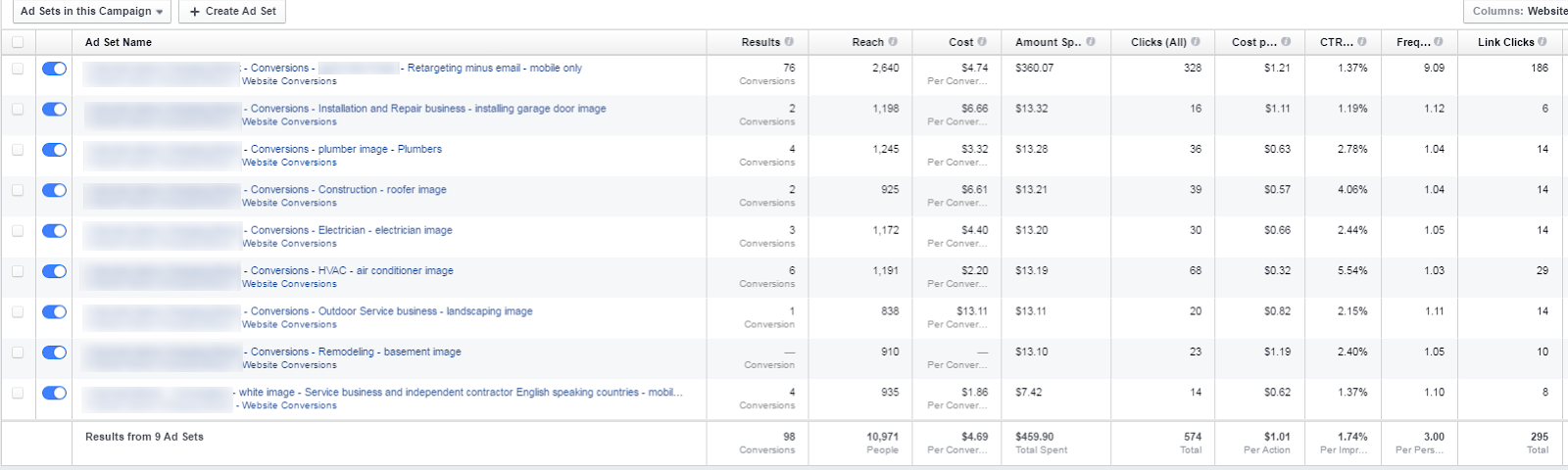
We used Job Titles and fields of study for the targeting.

Using a combination of demographic and interest targeting can help you reach your perfect customer, but be sure to do a variety of tests.

#6 Use Engagement to Spot Content that will Get Cheaper Clicks

Boosting your Posts can be an “easy” way to push your content into the News Feed with the decreasing organic reach. But I’ve always been a proponent of only boosting your content to your current Fans. That way your Boosted Post is naturally optimized to get engagement on that post only. Plus, you don’t waste money getting Likes on a post from a non-fan who will never see your content again.

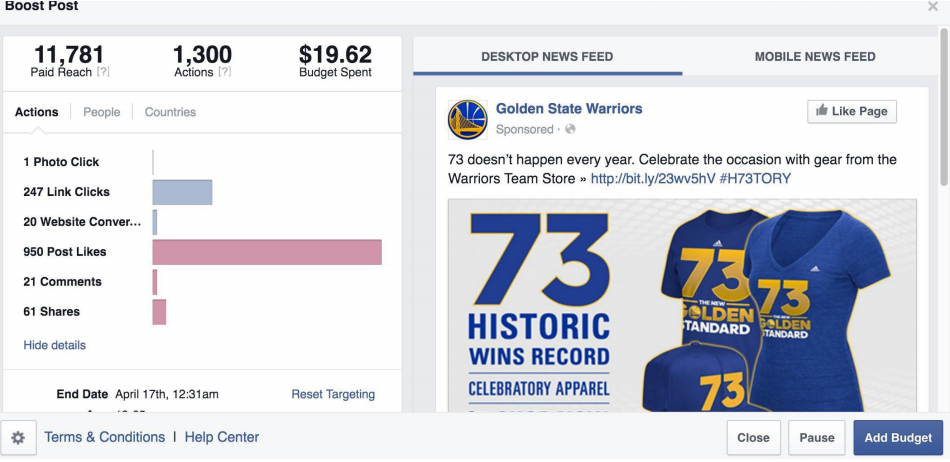
Dennis Yu recently showed me some cases where using Boosted Posts combined with great Custom Audiences and Targeting helped increase fans and conversions.

In this case, $20 in spend led to huge interaction and 20% conversion for apparel of the Golden State Warriors. (Images courtesy of Dennis Yu.)
And by using targeted keywords that specifically relate to the post, along with a video, they’re getting big reach and video views on a small budget.
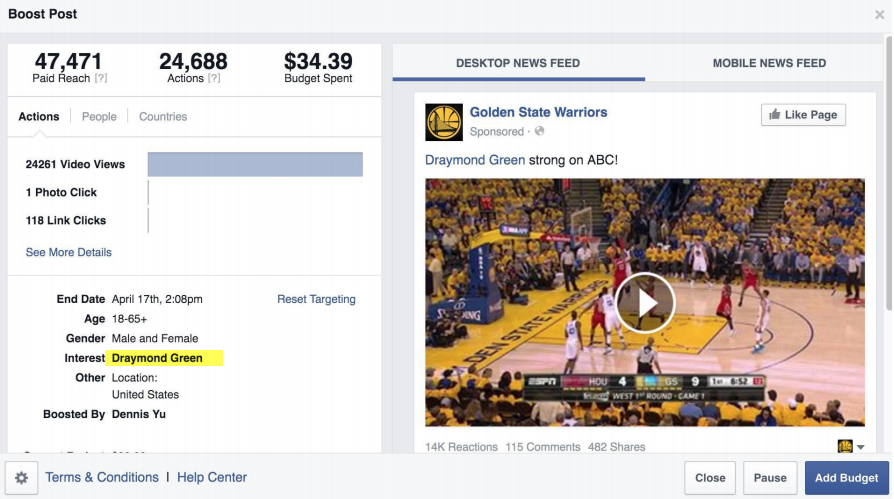
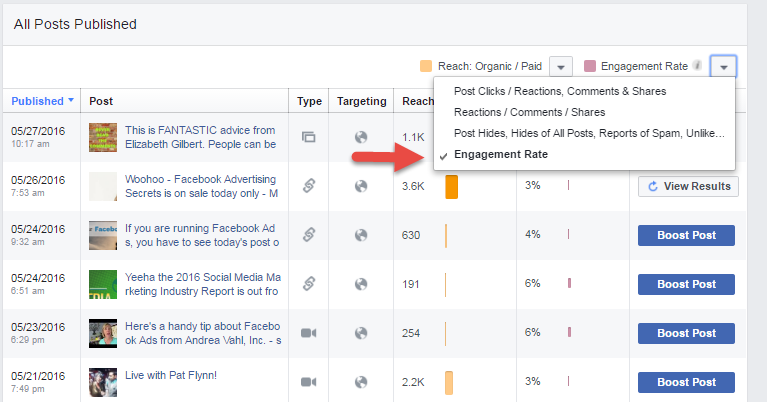
How does Dennis determine if a post is worth boosting? He looks at the current Reach of the Post and if there is already 10% Engagement (at least 10% of the people Reached have interacted with the post), they know that by giving that particular post a “Boost” it will essentially go viral and cost very little for big interaction.

His rule of thumb might not be right for everyone. Look at the Engagement Rate of your Posts in the Insights area and see which posts got good engagement. Your magic number might be something like 8% or 7% or whichever posts you decide are already getting good engagement.
#7 Watch All Parts of Your Funnel with Conversion Tracking

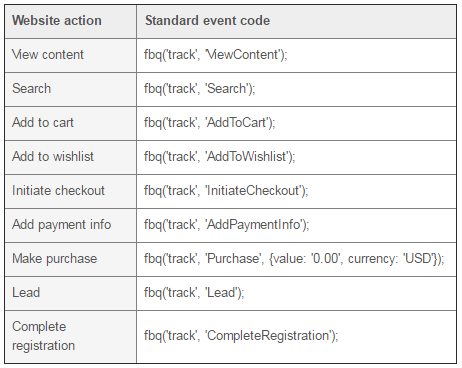
If you have a multi-step funnel, make sure you track each step of the conversions by using the appropriate Standard Event codes. 

Add the Standard Event code to the base Facebook Pixel that’s installed on your web pages to see where people are dropping out of your process.
Now when someone adds something to your cart but doesn’t purchase, you can see that in the Facebook reports. In this example, the top ad converted to a sale at almost twice the rate of the 4th ad down, which had a lot of Add to Carts but not as many full conversions. 

Now you can create a Custom Audience of all the people who added your product to their cart but didn’t buy. Then target a special ad to that specific group – super powerful!

Facebook ads can give you crazy-good return on the money you spend, but you also have the potential to waste a lot of money if you take a “set it and forget it” approach. Make sure you’re vigilant about watching the right stats, running a variety of tests, and putting a stop to what isn’t working.

Hope that gave you some great ideas for improving your next Facebook Ad campaign. Have I missed any fave advanced Facebook ad techniques??

~Andrea


The post 7 Advanced Tactics Pro Facebook Marketers Use to Boost Conversions appeared first on Copywriting For Start-ups And Marketers.


from
http://redirect.viglink.com?u=https%3A%2F%2Fcopyhackers.com%2F2016%2F06%2Fadvanced-tactics-pro-facebook-marketers-use%2F&key=ddaed8f51db7bb1330a6f6de768a69b8

Podcasting Defined in 60 Seconds [Animated Video]

content marketing glossary - what is podcasting?

Perhaps you’ve reached a stage in your business where you are ready to do something new.

You have a story to tell or education to share, but you’d like to do more than just writing. Or, you may feel that your audience isn’t growing as quickly anymore.

If you relate to any of those scenarios, then you might want to consider launching a podcast.

But what exactly is podcasting?

Watch our short, fun video about podcasting

With help from our friends at The Draw Shop, we whipped up 12 definitions from our new Content Marketing Glossary into short, fun whiteboard animated videos.

Check out our video for the definition of podcasting:

Animation by The Draw Shop

And for those of you who would prefer to read, here’s the transcript:

A podcast is audio content you can subscribe to and listen to on demand. This American Life is a podcast. The incredibly popular crime-investigation show Serial is a podcast.

In fact, you can think of a podcast as portable radio. Once you’ve downloaded the episode, or subscribed to the show, you can listen to your favorites anytime, anywhere — as long as you have a smart device like a phone or tablet.

Some podcasts follow an interview format, like Marc Maron’s WTF. The podcast Stuff You Should Know uses a rotating panel of experts to discuss different topics. Some are sheer entertainment, like The Truth, which is essentially a movie for your ears. And then there are long-form monologues like Dan Carlin’s Hardcore History.

Rainmaker Digital has an entire network of podcasts around the themes of digital business and marketing. You can find all our shows on Rainmaker FM.

Unlike reading a blog post or watching a video, podcasts are the only truly mobile medium. You can listen to them while walking, driving, or lying down with your eyes closed.

Share this video

Click here to check out this definition on YouTube and share it with your audience. You’ll also find 11 additional Content Marketing Glossary videos.

Podcasting resources

If you would like to learn more about podcasting, visit these three resources:

Learn more from the Content Marketing Glossary

We’ll feature the rest of the videos soon, but if you don’t want to wait, you can watch all the videos now by going directly to the Content Marketing Glossary.

By the way, let us know if there are any definitions you’d like us to add to the glossary! Just drop your responses in the comments below.

The post Podcasting Defined in 60 Seconds [Animated Video] appeared first on Copyblogger.


from
http://redirect.viglink.com?u=http%3A%2F%2Ffeeds.copyblogger.com%2F%7E%2F160630218%2F0%2Fcopyblogger%7EPodcasting-Defined-in-Seconds-Animated-Video%2F&key=ddaed8f51db7bb1330a6f6de768a69b8

Wednesday, 22 June 2016

How to Land Writing Clients with Advanced Facebook Ad Targeting

The idea of spending money to make money can be a bit scary.

Especially if you’re in a freelancing slump.

After all, Facebook Advertising is certainly not free.

But there is one thing that Facebook Advertising is, and that is specific.

Unlike Google, Facebook is not going to have you competing against Scripted, Outsource, and Upwork, who are likely going to outbid you for the term freelance writers. Instead, I’m going to have you targeting your ads to very specific people. People who fall into one of three categories.

1. Clients who are already interested in hiring you. They just need a little gentle reminder.

2. Clients who are in need a freelance writer, but they don’t know it yet.

3. Clients who are in need of a freelance writer, but they are looking in all the wrong places.

You can target all three of these types of clients using advanced Facebook Ad Targeting. Here’s how.

Quick note: I’m going to assume you already have a website and a Facebook Page at this juncture. If you don’t have a website, skip step 2. If you don’t have a Facebook Page, you’re going to need one ASAP. The short and sweet of it is to go here. Choose the Artist, Band or Public Figure category. Choose the Writer subcategory. Use the wizard to fill out your basic info and upload a professional headshot. Grab a stock image of someone writing at a keyboard for your cover image. Post links to your page to your best articles and backdate the posts for when those articles were published. Invite your friends to become a fan. Now continue.


have you tried finding clients using Facebook ads? @kikolani shows how on @copyhackers
Click To Tweet


Step 1: Set up your Facebook Ads Pixel.

I don’t even have to tell you how to set up a Facebook Ads account, because if you don’t have one yet, Facebook will set one up for you the second you click on this link to go to Facebook Ads Manager. If you do have one, you’ll just click on the account you want to use for your advertising.

Next, you’re going to look for Pixels under the Ads Manager menu.

Screenshot of FB ads manager

When you click on this, if you’ve never set up a Facebook Pixel before, you’ll be greeted by this.

Facebook pixel screenshot

Click the Create a Pixel button and name it. You can only have one per advertising account, so don’t worry about confusing it with other Pixels.

my website pixel screenshot

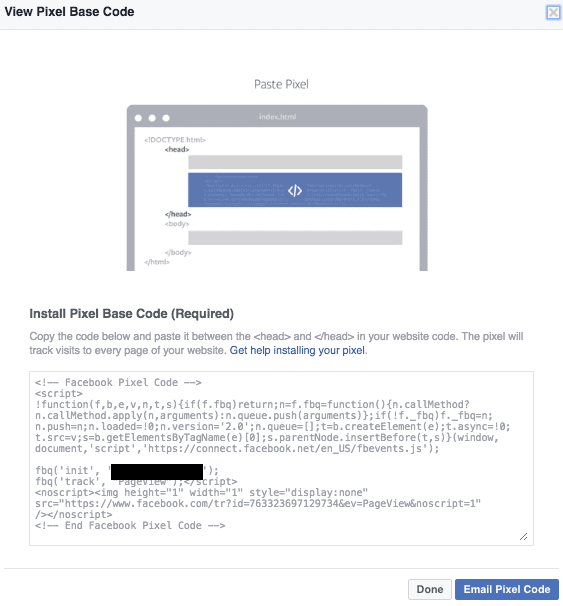
When you click the Create Pixel button, you will get the option to install your pixel by getting the pixel code now or emailing the pixel code to the person who manages your website and having them install it for you. The code has to be added between the opening and closing HEAD tags of your website.

Paste pixels

Depending on how you created your website and how well you know your HTML code or website platform, this could be an easy or tough task. Many WordPress themes, for example, have a setting somewhere that allows you to add scripts to your header area. It’s sometimes just a matter of finding that setting. Other platforms are the same – you may just need to contact support and ask here you should add scripts that need to be placed between the opening and closing HEAD tags.

Once you’ve done this, Facebook will start tracking visitors that come to your website. This will allow you to target the first type of clients I mentioned in the introduction: clients who are interested in hiring you. They just need a gentle reminder.

Here’s how this works.

Once you have the Pixel installed, you’re going to create an audience using the Create Audience button on your Pixels screen. This audience will track all the visitors to your website.

Default pixel in FB

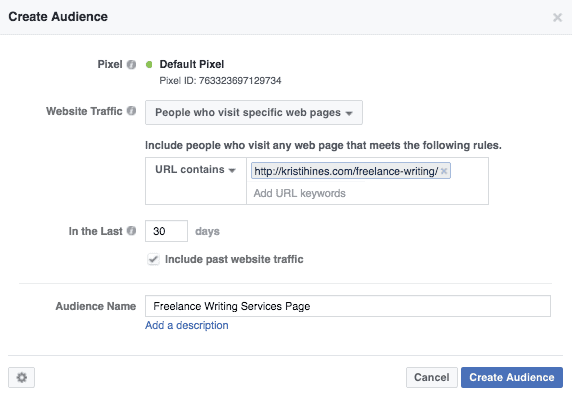
Now, let’s say that you offer more than one product or service. Maybe you just want to track people who visit your freelance writing service page in particular. You can do that as well by doing this.

create an audience in FB

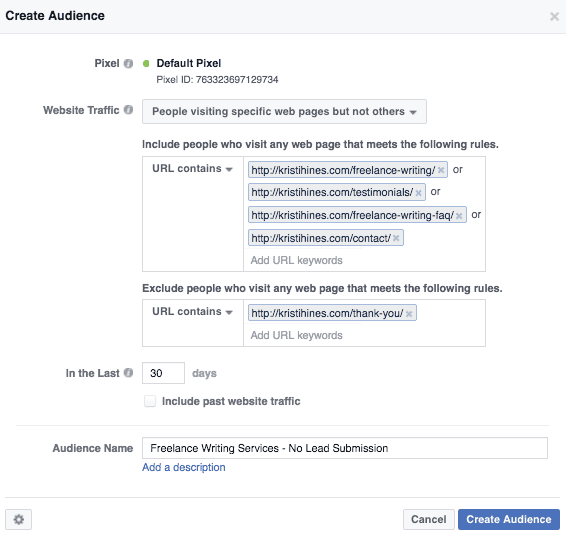
Or you can get super specific by tracking visitors to multiple pages, but not the page that designates that the visitor inquired about your services.

Create audience with default pixel


now i know how to create custom audiences on facebook. thanks @kikolani (via @copyhackers)
Click To Tweet


Speaking of designating who inquired about your services, you can also use the Create Conversion button to tell Facebook when someone has submitted a lead form on your website. All you need is a thank you page URL that visitors land upon when a potential client submits your contact / lead submission form. Use that to create a Custom Conversion like this.

create a custom conversion in FB

It will help Facebook get to know the type of people who are most likely to become your clients. Once it gets to know those people, it will be able to show your ads to the people more likely to convert into your clients.

Note that the use of your Custom Audiences will depend on how much traffic you receive. Facebook will let you know when you’ve reached an appropriate sized audience to start advertising to. To find out, check your Audiences.

Screenshot showing where to find audiences in FB

And look for the green light.

Green light city, sweetheart

Once you get the green light, you can start your ads to people who have visited your website. To do this, you will click the green Create Ad button that should appear at the top right of most pages in the Ads Manager. Then choose one of the following objectives, based on whether you chose to track conversions in Facebook.

How will you track conversions in FB?

Next, you’ll name your campaign something memorable.

Name your Facebook campaign

You’ll choose the Custom Audience for the website traffic you want to target.

Custom audience for ad

If you think all of your traffic is on point (aka, all of your leads are typically good), then you can continue to setting your ad placement and budget). If not, you might want to further narrow down your audience based on specific interests, job titles, or other specifics to ensure that only your ideal clients can click on your ad. You’ll know if you’ve narrowed it too far by watching the indicator bar to the right of your audience targeting.

Is your audience defined?

Facebook won’t let you be too specific or too broad in most cases.

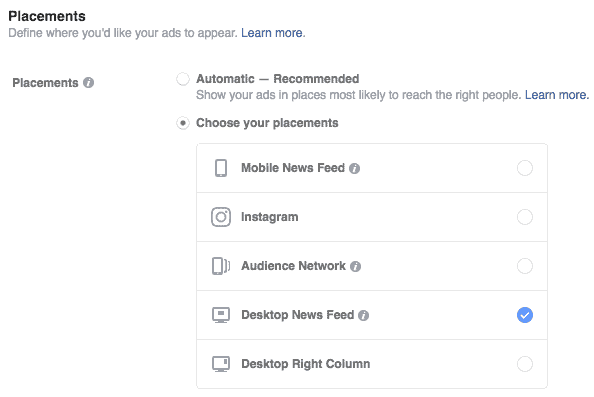
Next, you can choose your ad placements. While my website is mobile-friendly, I can look into my Google Analytics and tell you that 88% of my lead form submissions happened on a desktop browser. So why would I waste any of my ad budget on mobile ad placement? This may not be the same case for you, it is something to consider.

Where do you want your ads to appear?

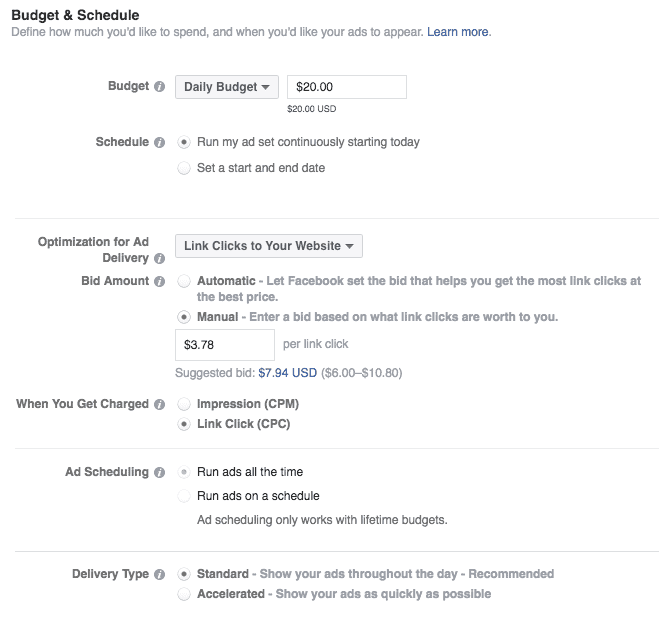
Next, you’ll choose your budget and scheduling. While automatic bid optimization might ensure your ad will get shown above everyone else’s, you can switch over to manual mode to find out how much you are likely to pay based on your audience targeting.

Set your FB ad budget, and schedule it! Screenshot

You can literally put any amount in that box that you want. Then watch your results. If you don’t see anything happening, go in and modify the bid later. Better to see if you can get away with a dollar per click at first than $6. This guide on Facebook will give you a better understanding of how bidding works and best practices for specific ad objectives.

The next part is the fun part.

Here’s where you design your ad.

At this stage, you’re designing an ad for people that have already visited your website. They already know they want a freelance writer, a copywriter, a ghost writer, a blogger, or whatever service you provide. You just need to give them that gentle nudge or re-trigger the pain point that brought them to your website in the first place.

Create your ad in Facebook

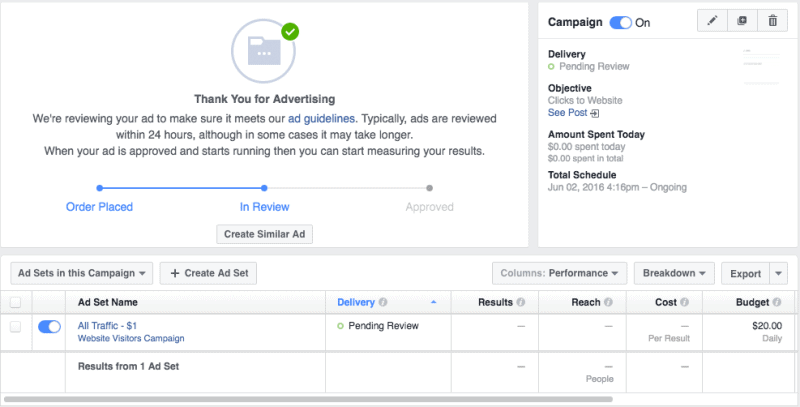
From here, you just have to wait for Facebook to approve your ad! You also have the option to click on the Create Similar Ad button to do just that – create similar ads that go out to the same audience, but with different headlines, descriptions, and images to see which ones perform best with your target audience.

Your ad is in review (screenshot of FB)

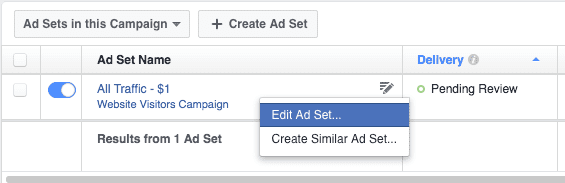
Oh, and if your ad gets approved, but the lowball budget doesn’t work, you can come back to the Ad Set and hover over it to edit it. That’s where you can change your CPC bid.

Set your Facebook bid

And at anytime, you can stop your ad campaign by clicking on the blue slider next to the campaign, ad set, or an ad itself.

You can always restart it if you’d like too, assuming it’s not an ad that references any set time.


3 easy steps to landing writing clients on facebook – by @kikolani on @copyhackers
Click To Tweet


Step 2: Use Saved Audiences for clients who don’t know they need a writer… yet.

You’ve seen them. You are randomly browsing the internet for pleasure, not business, when out of nowhere, a horrid landing page appears. A landing page so horrid, that it almost turns you off of the product you wanted to buy, even though it’s a great product. But the only reason you’re so turned off is because you’re a copywriter, not an average human being who can just be amazed by the flashy graphics and amazing testimonials.

There’s a good chance that the owner of the company behind said bad landing page thinks one of three things.

A) The landing page is awesome, and it converts well – what do you mean it sucks?

B) The landing page sucks, but it converts some, so why fix what ain’t broken?

C) The landing page was written by my friend, and she’ll be so hurt if I get it changed (but it really sucks).

Or maybe it’s not a horrid landing page. Maybe it’s a company with a blog that was last updated two years ago. Or a company with an email opt-in box but no lead magnet (i.e., a free ebook to entice you to sign-up for that list).

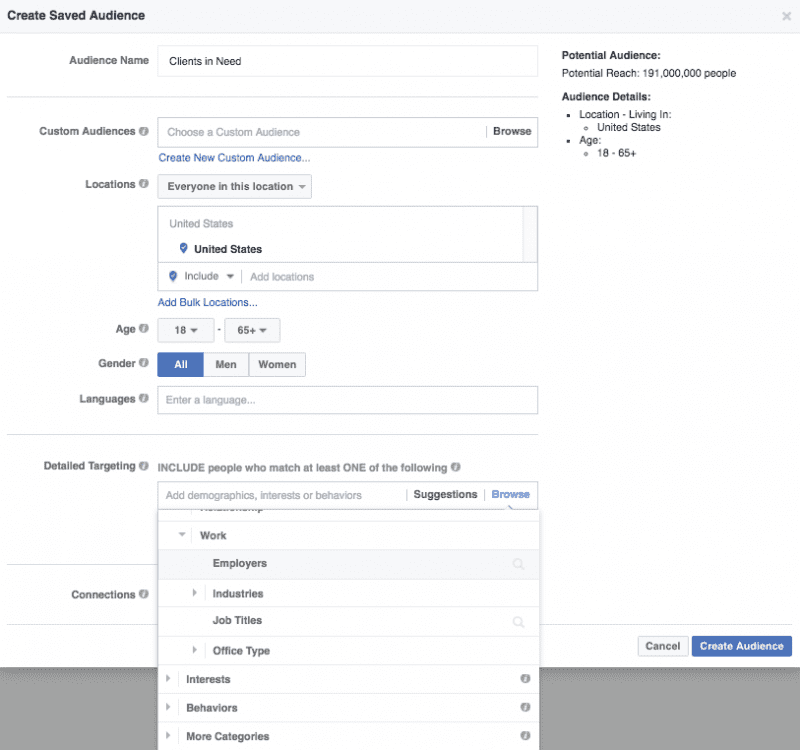
So what do you do, you glorious writer with newfound advanced Facebook Ad targeting skills? You add said company to a Saved Audience. This Saved Audience is going to be a Saved Audience that you call Clients in Need.

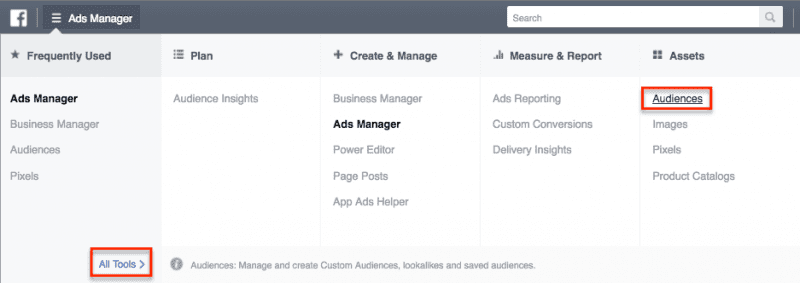
Stepping back for a second, a Saved Audience is simply creating a Facebook Ad audience before creating a Facebook Ad. To create a Saved Audience, you will go to your Ads Manager and select Audiences from the Menu.

The audiences view in Facebook

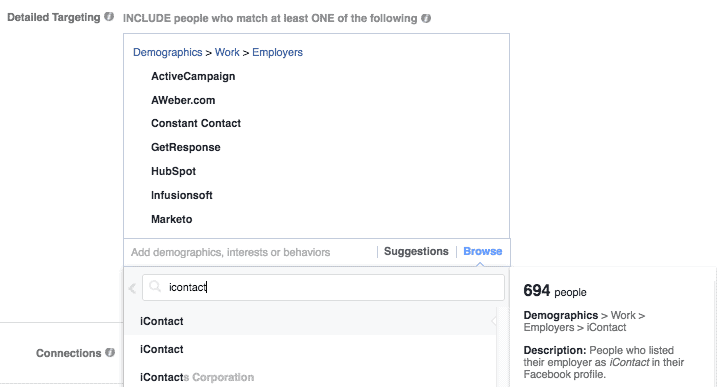
Then you will click on the Create Audience dropdown and select Saved Audience. You’re going to name your Saved Audience, such as Clients in Need – Blogging, and you’re going to down to the Detailed Targeting, click Browse, and go to Demographics > Work > Employers.

Advanced Facebook ads

Then you’re going to start adding in the companies who needed blogging help. Or, if you’re doing Clients in Need – Landing Page, you’re going to start adding in the companies who needed landing page help. Or, if you just simply want to write for specific companies, you can start listing them here as well. You never know who might be hunting for a writer.

Choose the business you want to hire you

The best part about this Saved Audience is that you can always come back and edit the audience as needed. So if you find more companies in need or you get hired by one of the companies on your list, you can modify your Saved Audience by checking the box next to it and selecting Edit under the Actions dropdown.

Modify your saved audience in Facebook

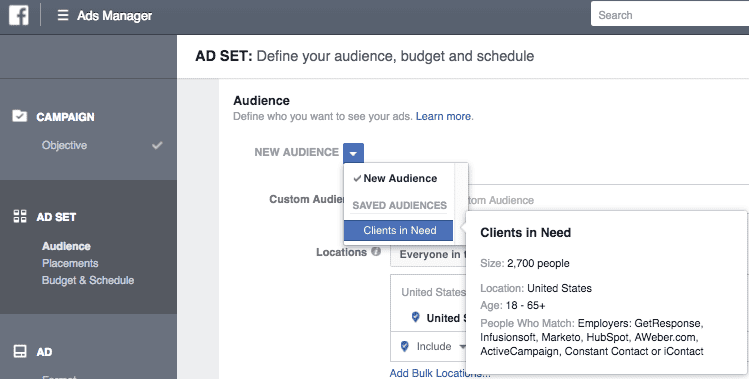
When you’re ready to create an ad for your Saved Audience, you go through the normal ad creation process of clicking the green Create Ad button and selecting your objective. When you get to the Ad Targeting area, you select your Saved Audience.

Ad targeting in Facebook

Then you make sure your ad creative matches your goal – to get the company’s attention that you can get their landing page or blog up to date again. Either the right person at the company will see your ad and take action, or someone at your company will forward your information to the right person. And say hello to your newest client!

Step 3: Use Saved Audiences to get the attention of prospects already in search of writers.

This is similar to the above step, but could be considered a bit more devious. I don’t know about you, but I have had a lot of people come to me saying that they have tried various freelance services, and the work they received was less than desirable. So don’t look at this as poaching from freelancers on freelance service networks. Look at this as saving other businesses from potential disaster.

You can start your search on freelance networks that allow freelancers to sign up for free and view job postings at their leisure.

Writing jobs on Upwork

If you don’t like that idea, poach off job boards and classifieds instead.

Take Craigslist, for example. Start by Googling site:*.craigslist.org “freelance writer” remote or site:*.craigslist.org “freelance writer” telecommute and take down as many company names as possible.

Or hop over to the ProBlogger Job Boards and get companies off of there. Because after each advertiser is done digging through the resumes, they might be refreshed when they see a great ad cross their path. Maybe even hit up the big career sites like Indeed, Monster, LinkedIn, etc.

Then take the approach from above using the Saved Audience technique, except this time, you’re aiming for companies who are obviously looking for a freelance writer. Label this Saved Audience accordingly.

You might be thinking: why run an ad when you can just apply for the job?

Well, I’ll tell you this – creating a Saved Audience and running an ad to 100 companies at the same time is faster than applying to 100 different jobs. Maybe not cheaper, but much faster. And if they come to you, you get to skip the application process. 🙂

Depending on where you get all of your information, you may want to tailor your ad text very carefully to really get their attention and steer them away from their job listing and towards your website and services.

And more importantly, you want to prepare them for the fact that you are going to cost more than what they were originally looking for.

You don’t want to say outright “Don’t hire from a writer from [SERVICE], hire me instead.” Instead, think subtle and emphasize quality over cost.

  • “Searching for the right copywriter for your business? The search is over!”
  • “Tired of sifting through one bad application after the next? Then stop sifting.”
  • “Don’t trust your copy to someone who doesn’t know your industry inside and out.”
  • “Don’t hire just any writer. Hire a writer who has 15 years of legal experience so that your website is as professional as your service.”
  • “There are plenty of ways to save money for your business. Discount copy shouldn’t be one of them.”

With advanced Facebook Ad targeting, you can land clients who might just need a gentle nudge, might not realize they need a writer until one is presented to them, and might need a writer but not know where or how to find one.

The best part? Depending on your current workflow, you can always turn toggle the ads on when you need new clients and toggle the ads off when you don’t. Just remember to keep updating your Saved Audiences. You never know when you will need them.

~Kristi

The post How to Land Writing Clients with Advanced Facebook Ad Targeting appeared first on Copywriting For Start-ups And Marketers.


from
http://redirect.viglink.com?u=https%3A%2F%2Fcopyhackers.com%2F2016%2F06%2Fland-writing-clients-facebook%2F&key=ddaed8f51db7bb1330a6f6de768a69b8
5 Lessons Learned from a SaaS Home Run

laura roeder - a customer-first approach to software

Laura Roeder is known for putting together agile companies that put the customer first — including her current hit, Edgar, a SaaS (software as a service) product that hit a million dollars in revenue in its first year in business.

She excels at “keeping it simple” — maybe because she ran ultra-successful online education companies for five years. She turned around and put those lessons into a software business — and she’s crushing it.

Laura leapt out on her own as a freelancer at 22, without giving it a lot of thought. As she laughingly put it in her Unemployable interview with Brian Clark, it was:

“… probably the worst way to do it.”

You can find that interview here: From Freelance Designer to SaaS Superstar

She hadn’t done any prep, she hadn’t lined up any clients … she didn’t even know what a proposal was.

Lesson #1: You learn by doing

While I don’t particularly recommend that approach for most of us, it underlies a key principle of starting a business:

You learn the real lessons by doing.

(If you’re looking for a lower-risk way to learn those lessons, the “side hustle” — a part-time business you can run in your spare time — is a fantastic middle road.)

Educating yourself is important — and you can find lots of techniques and strategies here on Copyblogger and our sister site, Digital Commerce Institute.

But education is the initial, back-of-the-envelope sketch. It’s when you actually start building a project, product, and business that you really make that learning come to life.

And you can start small — with experimental products and services that don’t require you to “bet the farm.”

Speaking of which, that leads us to one of the most common misperceptions about people who launch businesses …

Is it true that entrepreneurs are extreme risk-takers?

Laura definitely has a bold, optimistic personality — it’s what led her to take that leap at 22.

But there’s a big difference between “bold” and “foolhardy.”

Smart digital entrepreneurs launch controlled, low-risk offerings, sometimes called the minimum viable product model, until they find the perfect mix of product and market.

Laura’s software business, Edgar, grew out of the needs of her online education company. And unlike a lot of software development (raise millions of dollars, spend a year writing code, then see if you can get some buyers), she was able to deploy Edgar quickly to find out if it would interest her market.

Her development costs were light enough that the tool was worth developing even if they only ever used it in-house. But instead, Edgar turned out to be a home run.

Lesson #2: Reduce risk through experimentation

One of the things that makes business interesting is the need to constantly pay attention to shifting landscapes and patterns. And that allows you to notice what’s working — even if it’s subtle — and to figure out how to do more of it.

It also helps you notice what isn’t working, so you can correct the issue.

It sounds simple, and sometimes it is, but of course that doesn’t mean it’s going to be easy. But this type of careful observation is the best business teacher around.

Lesson #3: Look for the bigger picture

“At our company … one of the things we [ask employees] is, ‘Are you killing it?'”– Laura Roeder, from her interview on Hack the Entrepreneur

Laura values ownership in her company, giving each team member the information they need to make smart decisions without a lot of micromanagement.

How do they decide which decisions are smart? The ones that contribute to growth and excellent user experience — recognizing that success comes from the combined efforts of multiple teams and roles.

Rather than focus on one or two “KPIs” (key performance indicators) for each position, Laura recognizes that selling online is a matter of creating smart customer paths — and that requires a more holistic way of looking at teams and how they work together.

Her question to employees — Are you killing it? — makes room for a wider view of how the business is working.

Lesson #4: Focus on what you’re excellent at

Most founders, particularly in the early days, think of themselves as “chief cook and bottle washer.” In other words, they try to fill every single role in the company.

Laura, on the other hand, has always been strongly aware of her weak spots … which has allowed her to leverage her strengths.

As she said in her Hack the Entrepreneur interview:

“Something that I’m especially bad at is customer service.”

But rather than allowing that to create an expensive blind spot that “customer service isn’t that important,” it led her to value her support team that much more.

In fact, Laura wrote a fascinating article with that point of view here: Stop Insulting Your Team by Making Everyone Do Customer Service.

A key aspect of entrepreneurial creativity is figuring out how you’re going to work with the gaps of your own weaknesses — whether that’s by hiring someone, partnering, or some other creative solution.

Lesson #5: Think like a marketer

Because of Laura’s background, she thinks like a marketer — which gives her a monster advantage as a business owner.

She’s open to new ideas, but she doesn’t fall in love with them — until she sees how they can serve the needs of her audience and expand out into a wider market.

That lets her start planning a new product, project, or company with the right question:

What audience problem is this going to solve? How will this delight the audience I’ve pulled together?

This customer-first thinking is the cornerstone for most successful business, and it’s an antidote to what I call “Inventor’s Syndrome” — grinding away to push an interesting technical idea that buyers just don’t share your enthusiasm for.

Her million-dollar business Edgar came out of an education product called Social Brilliant, which taught Laura’s methodology for social media.

Edgar was a natural evolution that came at the intersection of what Social Brilliant was doing well (advice on social media strategy) and the audience’s needs (better, simpler tools to implement the techniques).

Keeping her eyes open and her attention focused, she realized the need — then discovered from her Ruby-on-Rails programmer fiancé that creating an automation tool was totally doable.

(His assertion that “I can do that in a week” did turn out to be a bit overoptimistic. Welcome to software development!)

Hear more about Laura’s journey to SaaS founder

We’re excited that Laura will be joining us this October at our live Digital Commerce Summit in Denver, Colorado on October 13-14.

Laura’s going to spill the beans about her journey, starting as that cocky 22-year-old freelancer, becoming a high-profile information entrepreneur, and now heading a hot SaaS that hit the million-dollar revenue mark its first year in business.

Her talk is called Leveling Up: How I Went From Infoproducts to SaaS, and will take you behind the scenes to see exactly how a non-technical marketing mind used the skills she developed in online courses to quickly become a major player in a whole new industry.

Join us for a focused, single-track curriculum that will teach you how to level up to the next phase of your business — and will load you up with action steps that you can start moving on before you even get on the plane home.

Claim your spot and get the best price on tickets here.

The post 5 Lessons Learned from a SaaS Home Run appeared first on Copyblogger.


from
http://redirect.viglink.com?u=http%3A%2F%2Ffeeds.copyblogger.com%2F%7E%2F160321336%2F0%2Fcopyblogger%7ELessons-Learned-from-a-SaaS-Home-Run%2F&key=ddaed8f51db7bb1330a6f6de768a69b8