Tuesday, 21 March 2017

Schedule 30 Minutes to Uncover the Keys to More Powerful Content

"Keyword research doesn’t have to be a marathon. A brisk, 30-minute walk can provide incredibly useful insights." – Britney Muller

I understand why content marketers may avoid SEO: it seems complicated and time-consuming.

But I’ve got good news. Today, you’ll learn why content marketers like you are well-positioned to use SEO tactics — possibly even more so than *cough* an SEO like me. :-)

Keyword research doesn’t have to be a marathon. A brisk, 30-minute walk can provide incredibly useful insights.

Even though keyword research benefits may not be obvious, the work you perform will help connect you to a wider audience on a deeper level.

Discovering how many people (a month) search for something, the words they use, and the questions they ask are important keys to more powerful content.

Why keyword research is essential

My previous company, Pryde Marketing, leveraged online data strategically for private medical practices.

When we were hired to do keyword research for an MRI company, we discovered that hundreds of people a month were searching “open vs. closed mri” but no sites provided any good answers, content, or photos for these searchers.

We decided to create a “Open vs. Closed MRI” page for our client that continues to see more than double the traffic of the homepage. And, it has brought in more than 50,000 unique visitors.

We were not successful because we thought of this content idea.

We were successful because we paid attention to the keyword data.

4 keyword research hacks

As Jerod Morris explained yesterday, there are keyword research tools built right in to the Rainmaker Platform and StudioPress Sites that you can use as you write and edit.

I’m going to show you some other tools as we go through the process of keyword research with an example client.

Example client: Hunter & Company (wedding & event planning)

Objective: Write better content for their website to improve digital marketing efforts.

Each of the four hacks below will take you 30 minutes or less to complete.

Hack #1: Blog category keyword research

Having five to 10 data-driven blog categories can help you organize your blog, rank for popular topics, and make it easier for readers to find more relevant content.

Evaluate top industry websites (8 minutes)

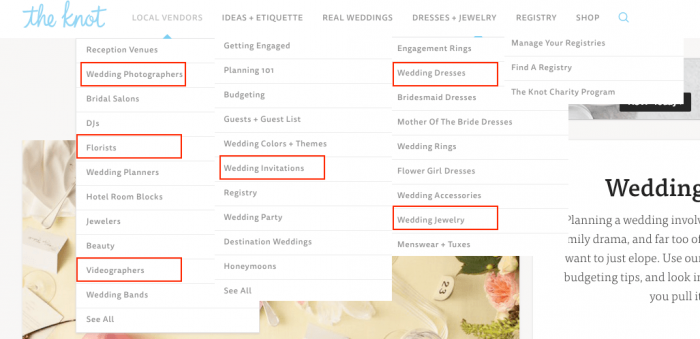
First, identify the most common navigation items and blog categories on leading industry sites.

Here’s a screenshot from The Knot:
Advanced search operators (3 minutes)

While exploring top websites, you can use advanced Google operators to dig deeper.

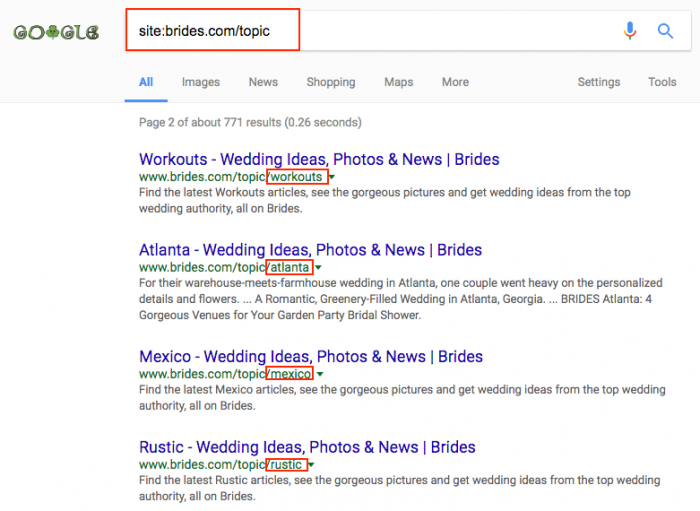
For example, Brides.com has topic pages such as “wedding beauty.” To view all of Brides.com’s topics, type “site:brides.com/topic” into Google:
Google suggestions (7 minutes)

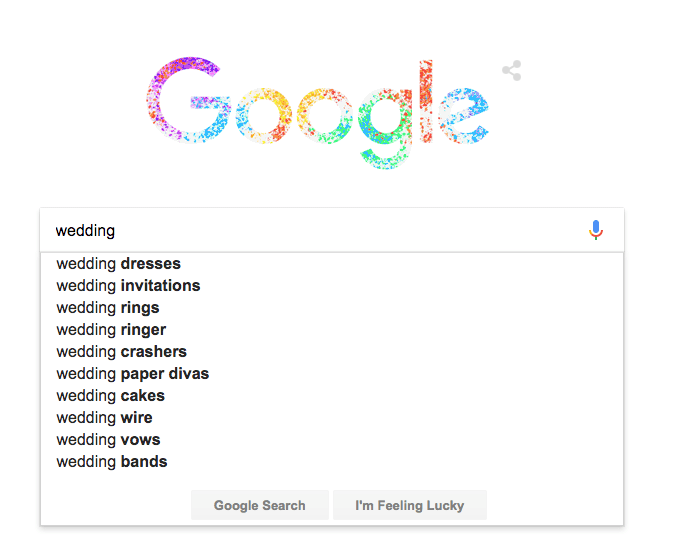
Now, Google “wedding” — and don’t hit enter!

Instead, make a note of the drop-down search suggestions. To get the most popular and/or trending wedding related searches, you can also search “wedding a” (don’t hit enter), “wedding b” (don’t hit enter) … all the way to “wedding z.”
Once you’ve aggregated keywords by using the tactics above, you’ll have a solid list:

wedding venues, wedding photographers, wedding dj, wedding beauty, wedding videographers, wedding bands, wedding budget, wedding invitations, wedding registry, wedding colors, wedding decorations, wedding party, wedding ideas, wedding cakes, wedding centerpieces, wedding hairstyles, wedding bouquets, engagement rings, wedding dresses, bridesmaid dresses, mother of the bride dresses, wedding rings, flower girl dresses, wedding accessories, wedding jewelry, wedding tuxedos, wedding registry, wedding ceremony, wedding reception, wedding cake, wedding food, wedding favors, wedding flowers

Let’s determine which categories are most popular by average monthly Google searches.

In Google Keyword Planner or Moz Keyword Explorer, you can view average monthly search volume (how many times a query like “wedding flowers” is searched for a month).

Google Keyword Planner (5 minutes):

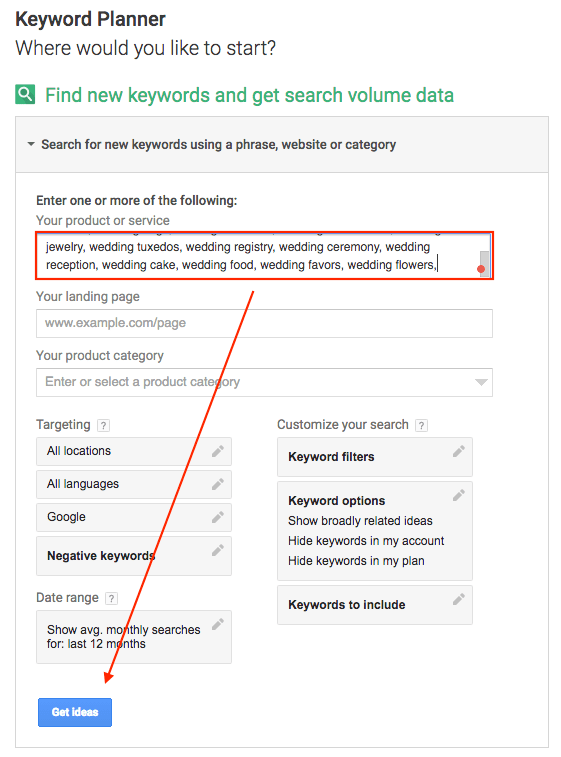
Step 1: In Google Keyword Planner, paste your saved keyword list into “Enter one or more of the following” and click “Get Ideas.”
Step 2: Evaluate and save search volume data while being mindful of the large search data ranges and limited data.
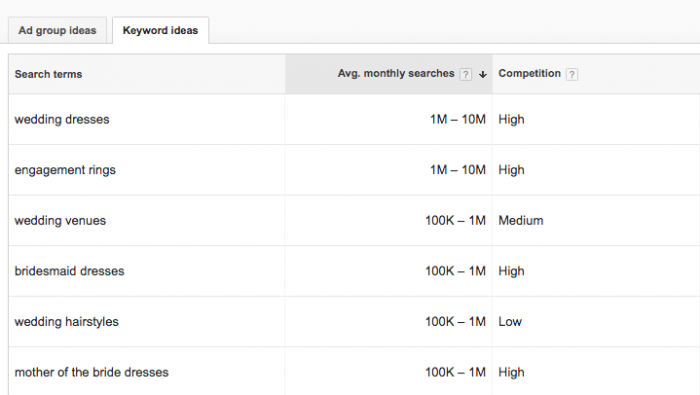
Note: Google will occasionally change your keywords to something different; “wedding videographers” was changed to “wedding videos” in this case. It’s important to make a note of those changes when you decide on the exact category names.

You should also explore the keywords below your immediate keyword search section. Sort by “Avg. monthly searches” (highest to lowest) to make sure you aren’t missing any other big categories.

Moz Keyword Explorer (7 minutes):

Step 1: In Moz Keyword Explorer, create a new list.
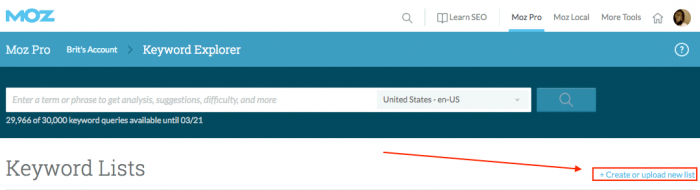
Step 2: Paste your keyword list into the “Enter Keywords” box.
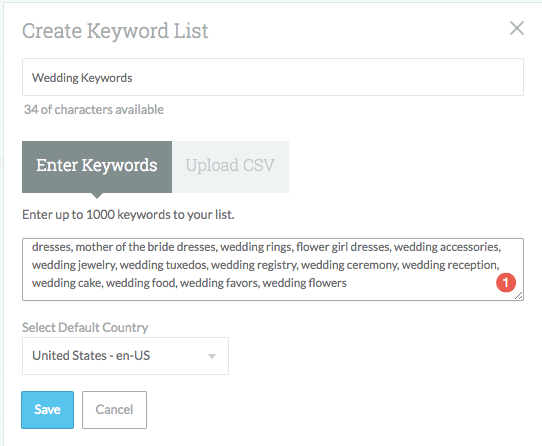
Step 3: Have a quick water break, because Moz Keyword Explorer will take a minute to gather data. Once the data is ready, sort by and evaluate average monthly search volume.
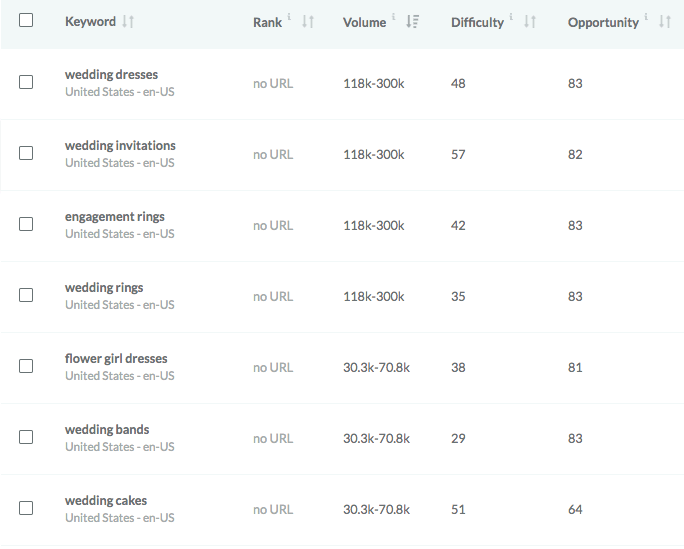
To set our blog categories, we need to finalize:

  • Which topics are the most popular?
  • Which topics are the most relevant for a wedding planner site?

With those questions in mind, I’ve chosen six of the most popular wedding topics, and there are several sub-categories within “Wedding Decorations.”

  1. Wedding Dresses
  2. Wedding Invitations
  3. Wedding Photography
  4. Wedding Cakes
  5. Wedding Venues
  6. Wedding Decorations (Wedding Flowers, Wedding Colors, Wedding Centerpieces, Wedding Venues)

Hack #2: FAQ keyword research

Answering the questions that are most commonly searched about your product or service will provide value to your readers and solidify you as an authority in your niche.

Here’s how to gather the most commonly asked questions on a topic.

Use AnswerThePublic.com (10 minutes)

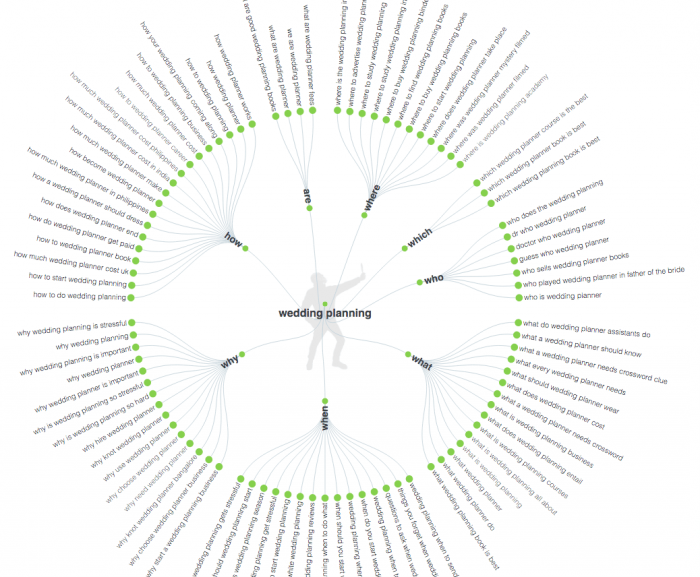
Search for your product or service on AnswerThePublic.

While the visuals in the snazzy question wheel above are fun, it’s easier to review the questions by clicking the top right, yellow “export to csv” button and deleting the extra questions you don’t need.

Moz Keyword Explorer (10 minutes)

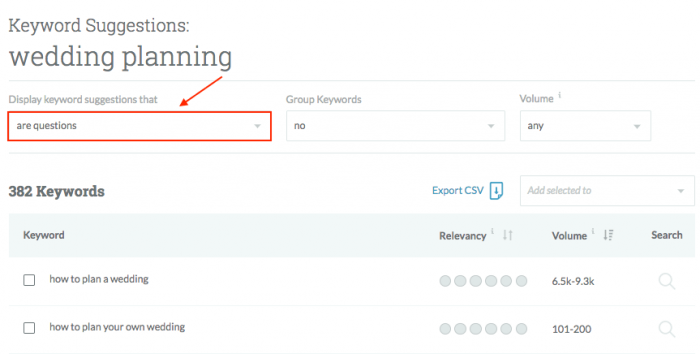
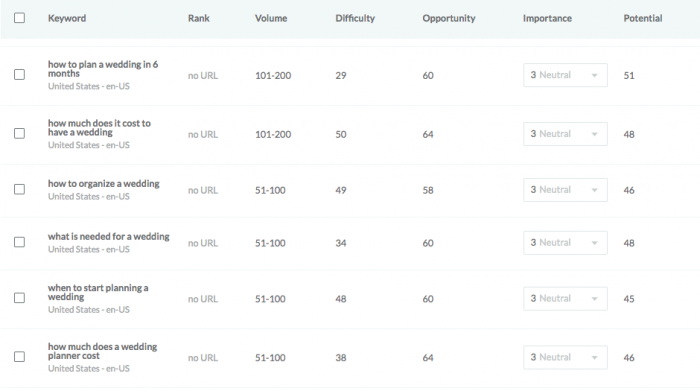
Step 1: Search and filter “display keyword suggestions” by “are questions.”
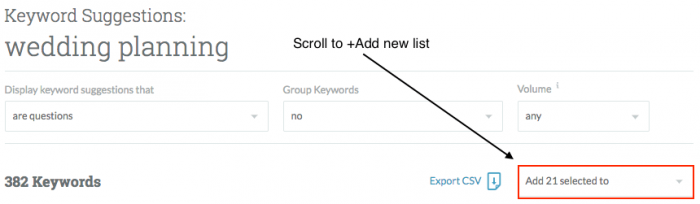
Step 2: Add relevant questions to a new keyword list.
Step 3: Add relevant AnswerThePublic questions to the list.
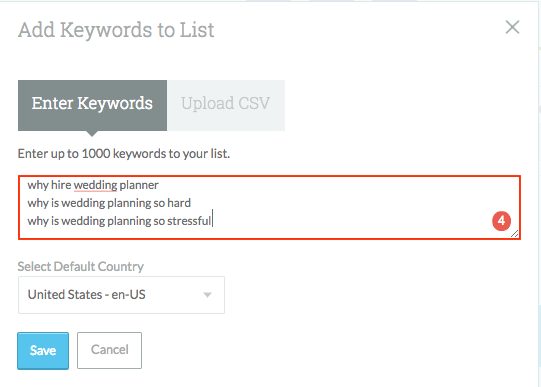
Your research is done!

I wouldn’t worry about evaluating search volume too closely for FAQs because questions are typically more long tail (they have a lower search volume and are usually easier to rank for). Which, in multitudes, can be very valuable to your site.

Now you can start adding your newly discovered FAQs to an FAQ page. (Try to avoid very similar types of questions.)
Hack #3: Competitive content research

Ready to glean insights from your competitor?

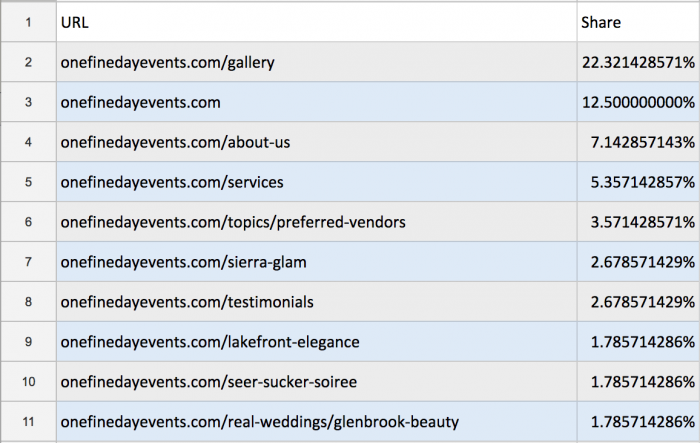
Evaluate your competitor’s 10 most popular pages on SimilarWeb (5 minutes)

SimilarWeb allows you to uncover the specific type of content your audience finds on a competitor’s website.

Here are the 10 most popular pages on OneFineDayEvents.com:
Evaluate each of the top pages and gather three takeaways (20 minutes)

What should Hunter & Company observe?

  1. Images. The most popular “Gallery” page confirms that images are extremely popular in the wedding and event space. Maintaining an optimized gallery and incorporating more images into content should be a top priority.
  2. Category pages. Notice that the “Preferred Vendors” page is a Category page. It’s something Hunter & Company should consider adding to their site as well.
  3. Testimonials. Hunter & Company can collect testimonials to display.

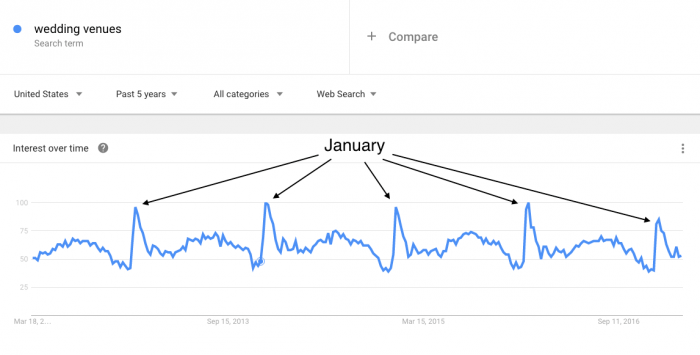
Pro Tip: Use Google Trends to evaluate seasonal searches and prepare competitive content months before it spikes.
Hack #4: Keep up with “no click” Google searches

We are seeing a big rise in “no click” Google searches.

Here are charts from The State of Searcher Behavior Revealed Through 23 Remarkable Statistics:
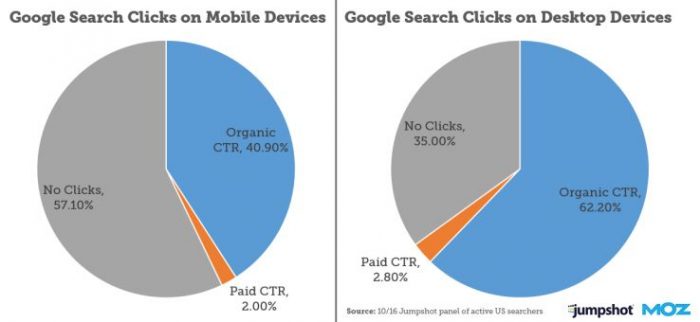
“No click” searches occur when individuals search for something — and find their answer — without ever clicking on a search result.

For example, if you search for “Denver weather,” Google will show you an eight-day weather forecast. Most searchers are satisfied with that and leave, resulting in a “no click” Google search.

“No click” searches are rising because Google continues to provide answers within Search Features like: Featured Snippets (answer boxes), “People Also Ask” Boxes, Knowledge Graphs, Weather Forecasts, etc.

Know which Search Features show up most often for your keywords (5 minutes)

Knowing which Search Features occur most frequently for searches related to your product or service can help you optimize for them.

Keep in mind that if you are page one or two of a desired Featured Snippet search, you are in a better position to get that Featured Snippet (than if you are on page three or further down in search results).

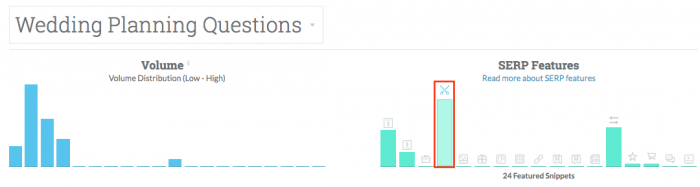
Remember our FAQs about “wedding planning” above? The majority of questions found in Moz Keyword Explorer have Featured Snippets (answer boxes) in their search results:
RealSimple.com currently has a large Featured Snippet for the keyword term “wedding checklist.”
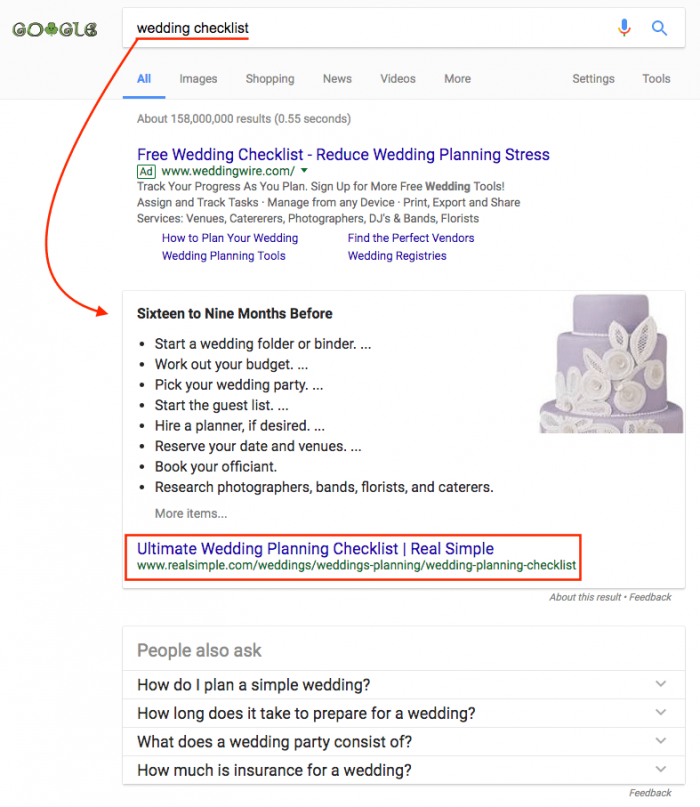
Brainstorm a better wedding checklist (15 minutes)

How could Hunter & Company create a more useful checklist? They could:

  • Hire a freelance developer to create a printable wedding checklist calendar that, once a reader enters their wedding date, populates with scheduled to-do list items
  • Create an IFTTT (If This Then That) recipe to schedule Google Calendar To-Do Reminders based on the user’s wedding date
  • Provide a more beautiful, detailed, user-friendly wedding checklist for their site

Over to you …

Which keyword research method are you most looking forward to trying?

After you’ve performed one of the hacks above, report back and let us know about any interesting discoveries you’ve made.

The post Schedule 30 Minutes to Uncover the Keys to More Powerful Content appeared first on Copyblogger.


from
http://feeds.copyblogger.com/~/283490418/0/copyblogger~Schedule-Minutes-to-Uncover-the-Keys-to-More-Powerful-Content/


Monday, 20 March 2017

7 Easy-to-Forget SEO Steps You Need to Consider Every Time You Publish

"Remember these elements to help more of the right people find your content." – Jerod Morris

“But I don’t really think about SEO very much anymore.”

That was my initial reaction when we all agreed that March would be SEO month here at Copyblogger. At which point, of course, I knew I’d have to write about it.

“Look, I just create useful content for people. Do that, get it read, get it shared, get links, have good hosting and fast page-load times … and productive search engine results will follow, right? I mean, what else is there to say?”

Turns out, plenty.

Keyword research is more fundamental to your content marketing strategy than you may think. Also, you may already be making fatal optimization mistakes. Plus, who knew SEO advice could be so … practical? (Including #8, which will punch you square between the eyes.)

I read those articles, rethought my position, and decided to examine exactly how much I actually think about SEO on a post-by-post basis.

And, turns out, plenty. (Whether or not I realized it.)

It’s easy to forget about the basic steps I’m going to outline below, but they shouldn’t be overlooked. Because the minute I stop doing them is the minute my content starts attracting fewer targeted visitors. Same goes for you.

So let’s start at the top, because the first one is by far the most important of the seven — and it will take me the longest to explain.

(Note: I’m going to use my site AssemblyCall.com as an example throughout this post. It’s built on the Rainmaker Platform, which has all of the tools I’m about to mention built right in. And thank goodness, or I’d probably forget about them. StudioPress Sites has all of these tools built in, too.)

1. Be extra intentional about your SEO title tag

You don’t have to set an SEO title tag for each post. If nothing is defined in your post’s meta data, search engines will simply pull your on-page headline.

And if you’ve done your headline homework and know how to write good ones, chances are your headline can double as your SEO title without massive negative repercussions.

But is it ideal? That’s the question. (It’s not.) And if it’s not, why wouldn’t you take an extra minute to be more intentional with your SEO title?

Let me give you an example …

Here’s a recent post from AssemblyCall.com. Backstory: our resident expert bracketologist posted his final projections for the NCAA Men’s Basketball Tournament.

Screen Shot 2017-03-17 at 1.41.43 PM

The headline follows the same simple and straightforward pattern that you see on all of our bracketology posts.

But here is the SEO title, set from the post edit screen inside of Rainmaker:

Screen Shot 2017-03-17 at 1.44.06 PM

You can’t see the full title, but here it is:

March Madness: Final Bracket Projections for 2017 NCAA Tournament by @AndyBottoms.

So why the differences?

First, because “March Madness” is an oft-searched term by basketball fans seeking this information — which I know from having done my keyword research. But the headline “March Madness: Final 2017 NCAA Tournament Bracket Projections” would look goofy and cluttered at the top of the page, especially on mobile.

Adding it to the SEO title allows me to get it into the search result, where it will have the most impact.

Second, I know that the first five to six words in an SEO title are the most important real estate. After that, people may not see the rest because it can get truncated in search results (as you can see in the screenshot).

So I rearranged the on-page headline to get “Final Bracket Projections” in before “2017 NCAA Tournament.” Why? Because the latter phrase is somewhat redundant with “March Madness.” But it’s essential that searchers know what, specifically, this post will tell them about March Madness, otherwise they won’t click.

This arrangement of the words balances the more generally searched terms with the essential specifics about the content — which is the part that actually drives clicks.

Third, notice the Twitter handle (@AndyBottoms) there at the end. Did you know that when people click the share button to tweet your post, Twitter usually pulls the SEO title, not the on-page headline? It’s true.

Since Andy is a known entity among college basketball fans for his bracketology prowess, I included his Twitter handle to add authority to the link when it’s included in the tweet text. Plus, he’ll be alerted when someone shares it and can retweet the share or reach out to that person.

Three small, subtle differences. All important. And each opportunity would have been wasted if I’d just been happy with the on-page headline and not considered the SEO title.

And here’s the fun part:

It took me way longer to type this, and for you to read this, than it did for me to edit the headline for the SEO title. I’ve been at this for a while, so it’s second nature at this point. So much so that I sometimes take it for granted.

If you haven’t developed this habit yet, take it seriously. Start doing it. And once it’s a habit, you’ll be creating usefully distinct SEO titles in less time than it takes you to floss.

2. While you’re at it, be strategic with your meta description too

You might as well take a minute to define your meta description. Typically, this is what shows along with your SEO title in search engine results.

Sure, search engines sometimes take liberties and pull their own excerpt from inside of your post for the meta description — usually when the search result is generated by a keyword that is not in the meta description but appears elsewhere in your content.

But we can’t worry about that. We’re worrying about the results we can control.

Screen Shot 2017-03-17 at 3.42.34 PM

See how I used the phrase “NCAA Tournament bracket projections” in the screenshot above? I did this to ensure that the “NCAA Tournament” part was visible in the search engine result, since the addition of “March Madness” to the SEO title had pushed “NCAA Tournament” toward the cutoff point. (Remember from my first example?)

I also wanted to include the phrase “field of 68,” which is a tertiary phrase that might draw some search interest.

The meta description is important because it’s your second chance to include important keywords that might not make it into your title tag.

In hindsight, I probably could have been even more strategic with keywords in this description. I had more real estate available. But I was also trying to balance my tone and connecting with the audience — because, remember, the meta description often auto-populates when someone shares your post on Facebook.

This was a good opportunity to display some gratitude to the loyal audience members who had kept up with Andy’s daily updates throughout the previous week.

And don’t forget: optimizing for humans is optimizing for search engines. 😉

3. Decide if your post will need a 301 redirect in the future

What if you write a post that has a short shelf life and you want it to be available in search engines during that short time frame when it’s relevant?

Cool. Write it. Publish it. (Add a good SEO Title!) Enjoy the traffic and attention.

But what do you do when the short shelf life ends? Add a 301 redirect.

Below is an example of a limited-time offer we presented a few weeks ago. Focus on the last bullet point.

Screen Shot 2017-03-17 at 2.47.38 PM

Notice the part about the offer expiring on March 5? Okay … so what happens if someone visits this post after March 5? The offer is no longer valid, but the search result will still live on in Google and elsewhere.

Which is fine. I’ll take the traffic. I just want visitors to end up somewhere they can take action.

So I have two options:

  1. I can update the post with a more timeless call to action (a reasonable choice).
  2. I can simply redirect the post to another page on the site.

In this case, I took the latter option because I wanted to send people to the main page for our Deal of the Week posts, which has a timeless call to action (you can see it here).

Screen Shot 2017-03-17 at 2.56.28 PM

Yes, sometimes optimizing search results is about going back to old posts and ensuring a visitor gets something useful when they click.

(By the way, you’ll notice we do the same thing here at Copyblogger with posts that have expired offers.)

Or perhaps, you don’t want some posts indexed by search engines at all …

4. See if you should add a “noindex” tag

And that’s when a noindex tag comes in handy.

Say that I had wanted the post referenced above to never appear in search engines at all, but just on the site. I could have added a noindex tag to it using the same SEO tool I used to add the 301 redirect.

Screen Shot 2017-03-17 at 2.58.07 PM

When is it a smart time to add a noindex tag?

  • Maybe you have a special offer that is only for people already in your audience, but not for newcomers or window shoppers.
  • Maybe you want to make a special announcement to your existing readers, and you even want to post about it on social media, but it wouldn’t have any relevance for a new search engine visitor.
  • Maybe you’re trying out a new post format and you want some feedback, so you publish the post, knowing that only your die-hard audience members (daily visitors) will see it. You don’t want this indexed.

I could go on.

The point is: Optimizing for search engines also includes determining what posts you don’t want indexed. The noindex tag gives you some choice in the matter.

(Important note: The noindex tag is not perfect. Sometimes search engines index the page anyway. So just be careful.)

5. Use the Canonical URL to let search engines know which page to index

For each episode of The Digital Entrepreneur, we post the podcast in two places:

  1. Once on Rainmaker.fm (here)
  2. Once on DigitalCommerce.com (here)

Why?

Because Rainmaker.fm is the network site, which hosts the RSS feeds that podcast aggregators like iTunes use. So we have to publish it there.

But we’d rather visitors go to DigitalCommerce.com, because once on that site they are more likely to start a free membership, which could lead to a paid membership, which hopefully then leads people to the Rainmaker Platform.

Do you see the issue? Two posts, with very similar content. How do search engines know where to point people?

We tell them — using the Canonical URL field in the SEO settings.

Since we want people to end up at the episode page on DigitalCommerce.com, we use that link when we edit the Canonical URL field on the Rainmaker.fm post.

Like this:

Screen Shot 2017-03-17 at 3.31.32 PM

So, in theory, and hopefully in practice, the DigitalCommerce.com page is the only one that shows up in search engine results when someone types in a relevant keyword for that content.

This tip is important to keep in mind not just when you operate multiple websites, but also when you syndicate your content on other websites.

Say you syndicate a post on LinkedIn, Medium, or as a guest post on someone else’s site — make sure you point the Canonical URL tag back to the original post on your site.

6. Commit to doing regular keyword research to confirm your hypotheses

We all have hypotheses about the language our audiences use and the terms they search for. Some of us are better informed than others, depending on the quality of the reading and listening we do.

But all of us could benefit from regularly stepping back, rolling up our sleeves, and doing good ol’ keyword research.

As Brian said:

“Let me be frank … it’s simply negligent to not use keyword research to understand the language of your audience so that you can reflect it back to them.”

You’ll greatly benefit from having a tool like this right there at your fingertips while you’re writing and editing posts:

Screen Shot 2017-03-17 at 9.04.31 PM

Hitting “Research” provides me with an analysis of the provided keyword phrase, as well as alternate suggestions and their relative popularity and competition level. I can also see useful Google Trends information.

How might this be helpful? Well, for example, “SEO tips” might be provided as an alternative. If it has a higher popularity but a lower competition level, I might consider reworking my headline.

Or I might look at the alternatives and realize my hypothesis was right.

Either way, I’m more informed about the phrases people are actually using, which helps me create more useful content.

Also, as an aside, it helps to have a content optimizer:

Screen Shot 2017-03-17 at 8.58.05 PM

I’d say that page is optimized.

Full disclosure: I stacked the deck in my favor for the screenshot above by analyzing this post about content marketing from Copyblogger. I mean, how could that post not score 100, right? 😉

The keyword research and content optimizer tools are built into the Rainmaker Platform and StudioPress Sites. I don’t use them on every post, but I do use them regularly to check myself and make sure the post I’m working on and my site as a whole are presenting themselves accurately to search engines.

And now, tip number seven …

7. Pay attention to your post’s reading-difficulty level

Remember our most important premise when it comes to SEO: optimizing for people is optimizing for search engines.

A big part of optimizing for people is using language that can be easily understood. How sophisticated that language should be depends on the audience and context.

For example, the reading level for a website about fantasy football probably shouldn’t be the same as, say, The New Yorker. Audience expectations are very different.

But how do you know the reading level of your post? I check it using the content optimizer tool I showed you above.

The reading-difficulty level for this post is “Standard.”

I checked the reading-difficulty level for one of our bracketology posts at AssemblyCall.com. It was “Very Difficult.” I’m fairly certain we don’t need an article about bracket predictions to be more sophisticated than a post about SEO. That was a useful check.

How does this relate to SEO? Well, one of the factors that has been given increasing importance in search engines over the last few years is the level of activity people actually have with your content.

If people click your link, start reading, and then find they are not connecting with your material because you’re using big words and talking over them, what are they likely to do? Click the Back button and find another post. Search engines will take note of that.

Ensuring that your content is at a reading level appropriate for your audience will give you a greater likelihood of connecting, keeping visitors engaged, and improving your stature with search engines.

Which, after all, is the ultimate goal — and in that order.

You don’t improve your stature with search engines and then keep visitors engaged and connect better.

You connect and engage first, watch your search rankings improve, and then make smart, subtle tweaks like the ones I described above to make your search results even more effective.

What other SEO steps do you habitually take with all or most of your posts? Let us know in the comments below.

The post 7 Easy-to-Forget SEO Steps You Need to Consider Every Time You Publish appeared first on Copyblogger.


from
http://feeds.copyblogger.com/~/283147904/0/copyblogger~EasytoForget-SEO-Steps-You-Need-to-Consider-Every-Time-You-Publish/

Thursday, 16 March 2017

Zen and the Art of Content Marketing

Zen and the Art of Content Marketing

Google reminds me that we’ve covered the intersection of Zen and business a few times at Copyblogger … which doesn’t surprise me a bit.

At the heart of Zen is the concept (which is not a concept) of nonduality. In the words of Shunryu Suzuki:

“To speak of waves apart from water or water apart from waves is a delusion. Water and waves are one.”

I’m sure Brian Clark had been rereading his Suzuki Roshi when he advised us on Monday to “forget SEO” — because the wisest practice of SEO is to get out of dualistic thinking about SEO. It’s not separate or distinct from your daily business — it’s a facet of what you already do.

On Tuesday, we saw the return of the shaved head and serene countenance of Gardner Roshi Brian Gardner — our esteemed partner over on the StudioPress side of the house, who let us know what he’s been up to for the past, oh, half-year or so. Brian has recently started answering questions live on Thursdays (2:00 p.m. Eastern Time) at the StudioPress Facebook page — swing by and say hello later today, if you like!

And on Wednesday, Stefanie briskly reminded us that, nonduality or no, there are such things as content mistakes. She pointed out five ways to fix common ones. (Zen is, as it happens, quite practical.)

On The Writer Files, Kelton Reid wrapped up his interview with Oliver Burkeman, the author of the very Zen title, The Antidote: Happiness for People Who Can’t Stand Positive Thinking. And on Unemployable, Brian Clark and Robert Bruce sifted through nine pieces of success advice to see if they actually ring true. Great conversations.

May your weekend be filled with limitless blessings … and see you next week. :)

— Sonia Simone
Chief Content Officer, Rainmaker Digital

Catch up on this week’s content


imagine a world without search engines ... it's easy if you tryWhat if You Could Simply Eliminate SEO from Your Life?

by Brian Clark


where in the world has Brian Gardner been?Introducing the New StudioPress Blog

by Brian Gardner


Show your site visitors that you’re a match for them -- faster5 Content Optimization Mistakes You’ll Wish You Fixed Sooner

by Stefanie Flaxman


Does Email Marketing Still Work?Does Email Marketing Still Work?

by Sean Jackson & Jessica Frick


A New Ultra-Easy Resource for Creating Excellent WordPress SitesA New Ultra-Easy Resource for Creating Excellent WordPress Sites

by Sonia Simone


9 Daily Habits for Business Success9 Daily Habits for Business Success

by Brian Clark


How the Author of ‘The Antidote: Happiness for People Who Can’t Stand Positive Thinking’ Oliver Burkeman Writes: Part TwoHow the Author of ‘The Antidote: Happiness for People Who Can’t Stand Positive Thinking’ Oliver Burkeman Writes: Part Two

by Kelton Reid


The 'Create Anything' FrameworkThe ‘Create Anything’ Framework

by Jerod Morris & Jon Nastor


The post Zen and the Art of Content Marketing appeared first on Copyblogger.


from
http://feeds.copyblogger.com/~/281716158/0/copyblogger~Zen-and-the-Art-of-Content-Marketing/

Wednesday, 15 March 2017

5 Content Optimization Mistakes You’ll Wish You Fixed Sooner

"Show your site visitors that you’re a match for them — faster." – Stefanie Flaxman

By now you know that — technical details aside — SEO is not separate from content marketing; it’s an integrated aspect of content marketing.

Optimizing your content for search engines is part of your craft and a skill you can strengthen with practice.

But even when you rank well for search terms your audience uses, the real test is what happens when someone clicks through to your website. As Brian wrote on Monday:

“There’s nothing worse than a quick bounce.”

To avoid a quick bounce, you need to focus on content optimization. Since you don’t want to miss any opportunities to connect with your site visitors, study this list of five common mistakes — and how to fix them.

Mistake #1: Your visitors can’t tell if your content’s right for them

A row of four new houses that all look basically the same were just built on the street where I live. When a real estate agent starts taking potential buyers on tours of the houses, do you know what’s going to happen?

The potential buyers are going to examine the properties and make judgments about the differences they notice.

A woman is going to dislike the filigree on one of the front gates and select the house with the simple brown gate and extra large balconies. A man is going to love the house with the filigree on the front gate. Another woman is going to hate the house with the extra large balconies and prefer the house with additional living room space.

You get the point.

While these houses appear roughly similar from the outside, visitors quickly assess which property is right for them based on their personal preferences.

The same thing happens when people search for information about a topic. The websites that appear at the top of search results for a keyword phrase might all look the same at first, so visitors will quickly inspect your content to see if it contains the qualities that are right for them.

If your special qualities (your proverbial front gate with filigree, large balcony, or spacious living room) aren’t clear, you won’t convince the people you want to attract that you can satisfy their preferences.

How to fix it

Take 15 Minutes to Find Your Winning Difference

When you stop trying to attract everyone, it’s easier to attract those who recognize and appreciate your unique selling proposition (USP).

You’re right for some visitors and your competitors may be right for others. That’s okay.

Mistake #2: Your headlines aren’t specific

The quickest way to a quick bounce is a generic headline that could appear on any other website in your niche.

Typically, these weak headlines fail to offer a benefit, or the benefit could be so vague that it fails to capture the attention of the people who you actually created the content for.

They could also be boring.

How to fix it

Ask Yourself These 3 Simple Questions to Craft Better Headlines

If you immediately communicate details about why your content is helpful, you’ll grab the attention of people who need that kind of help.

Aim to infuse your headlines with the essence of your USP and show your site visitors that you’re a match for them — faster.

Mistake #3: You don’t edit

Plenty of websites have success publishing first-draft content. If rough drafts form a bond with the people you aim to serve … cool.

But if your content isn’t striking a chord with the people you want to attract and develop relationships with, you may need to push yourself further.

How to fix it

Discover Why Content Marketers Need Editors

Rough drafts often fail to effectively convey your messages. They may contain too much information or tangents that distract busy readers and make your content less useful.

Editing is about creating a content experience. Rather than expressing raw thoughts, you craft a thoughtful presentation that helps solve a problem. When you click on the link above, you’ll learn how to think like an editor.

Mistake #4: You don’t give visitors more opportunities to learn

Websites with a lot of content may still look like “brochure” websites if they don’t present a different angle or perspective that makes visitors think, “I like this specific approach to this topic.”

When visitors feel you offer them something they can’t find on other websites, they want to hear more from you and stay connected.

If you don’t anticipate a reader’s desire to learn more, he might bounce to other sites to see if they offer more resources.

How to fix it

Add a Tantalizing Incentive that Will Build Your Email List

Ideally, you want to have so much great content that when visitors land on your site they’re frustrated that they don’t have enough time to consume it all in one sitting.

They’ll have to make a note to come back. Now the question is:

Do they sign up for your email list so they don’t miss any new content?

Make signing up for your email list a no-brainer by providing an incentive that is a perfect match for their needs. Your email list could also offer exclusive content the public doesn’t see.

Visitors will feel like they hit the jackpot that day on their journey.

Mistake #5: You don’t empower visitors to make a purchase

Information is … information. It doesn’t spark the buying process.

If you don’t give visitors a taste of what it’s like to do business with you, you won’t convert prospects to customers.

How to fix it

Educate to Convert Your Prospects

When you convince your website visitors to keep up with everything you publish, you’re able to build the relationships that will build your business. And the right balance of content and copy helps your prospects imagine what it’s like to buy from you.

Demonstrate why your product or service will give them the transformation they desire.

Optimize your content to grow your audience

Here’s a suggestion:

Assign each of the mistakes above to a day next week, Monday through Friday, and spend a couple hours each day identifying where you might make those errors and how you can fix them. By the end of the week, you’ll have a wealth of new ideas about how you can improve going forward.

What’s your process for producing exceptional content that impresses your website visitors? In the comments below, let us know how you stand out.

The post 5 Content Optimization Mistakes You’ll Wish You Fixed Sooner appeared first on Copyblogger.


from
http://feeds.copyblogger.com/~/281251373/0/copyblogger~Content-Optimization-Mistakes-Youll-Wish-You-Fixed-Sooner/

Tuesday, 14 March 2017

Introducing the New StudioPress Blog

Where in the world has Brian Gardner been?

Well, it’s been a while since you’ve seen my byline around here at Copyblogger, but that’s for a few good reasons — I’ve had my head down and been working hard over at StudioPress (specifically, the all-new StudioPress Sites you’ve been hearing about).

If you’re interested in checking it out, you’ll see that the StudioPress site looks quite different from how it has in the recent past, and that’s because we’ve been making the experience over there the best we possibly can for our customers.

That, and we’ve been building the next generation of StudioPress. :-)

Here’s what we’ve been up to …

Introducing the brand-new, shiny StudioPress blog

A few weeks ago, we launched a new blog at StudioPress!

If you take a look at the address bar, you’ll see we’re using the .blog extension. You might be wondering why we chose to go that route, rather than just continue the blog on the main StudioPress.com site.

Our friends over at Automattic started serving up .blog domains late last year, and we jumped at the opportunity to secure this domain, along with a few other branded domains that made sense for our company.

I personally thought it would be a fun way to try something new but still keep a cohesive look between our main site and the blog. We are considering this an experiment.

On the StudioPress blog we’ll be publishing fresh content, including what’s new at StudioPress, announcements about theme releases, expert advice from our friends in the community, episodes of StudioPress FM, and replays of StudioPress Live — more on that in a bit.

Head over to the Official StudioPress Blog — the premier publishing resource for designers, developers, and bloggers.

Check, check, is this thing on?

Speaking of experiments, one thing I’m really excited about is our new initiative called StudioPress Live. Each week, I’m answering your questions live on our Facebook page.

Whether you’re a designer, developer, blogger, or some kind of in-between hybrid, this is the perfect opportunity to get your questions answered … find out what’s new at StudioPress, talk digital business, keep up with the Genesis community, and geek out on all things WordPress. 😉

Join me (for now) on the StudioPress Facebook page, Thursdays at 1:00 p.m. Central Time.

Oh, and I’ll be seeing you around Copyblogger a little more often in the future as well. More soon!

The post Introducing the New StudioPress Blog appeared first on Copyblogger.


from
http://feeds.copyblogger.com/~/280751102/0/copyblogger~Introducing-the-New-StudioPress-Blog/

Monday, 13 March 2017

Forget SEO

"Imagine a world without search engines ... it's easy if you try." – Brian Clark

Imagine.

Imagine a world without search engines …

It’s easy if you try.

No more surprise Google updates. No more worrying about XML sitemaps, robots.txt, and content analysis and optimization.

And perhaps most importantly, no more keyword research.

That last one means you’re going to have to go old-school to figure out the language of your audience to reflect it back to them. It’s going to take a lot more work.

You didn’t think you were going to get out of that one, did you?

Choosing the right words

“The difference between the almost right word and the right word is the difference between the lightning bug and the lightning.” – Mark Twain

When you’re executing on your content marketing strategy, what you say is crucial. But when it comes right down to engaging and converting your intended audience, how you say it becomes the definitive difference.

You need to speak the language of the audience. In a world with search engines, you get a glimpse directly into the mind of your prospect, based on the language they use when seeking a solution to a problem or looking for the answer to a question.

Back before search engines, writers and advertisers still had to discover the language of the intended audience. It just took more work.

You’ve likely heard of Eugene Schwartz, one of the most influential copywriters in the history of the craft. This is what he said on the topic back in the 1960s:

“One hour a day, read. Read everything in the world except your business. Read junk. Very much junk. Read so that anything that interests you will stick in your memory. Just read, just read, just read … There is your audience. There is the language. There are the words that they use.”

In that scenario, you’d have to rely solely on other content creators to get the language right. How do you know they did the proper work?

Still want to live in a world without search engines and keyword research?

You’re already doing the work

Let me be frank … it’s simply negligent to not use keyword research to understand the language of your audience so that you can reflect it back to them. And even when I’m not Frank (who is that, anyway?), you’re simply doing content marketing poorly if you’re not discovering and addressing the related topics that your prospects care about.

And once you’re covering the topics that matter, and using the language your audience uses, you’re doing most of what matters for search engine optimization. You don’t have to obnoxiously repeat keyword phrases anymore — Google has been smarter than that for years now.

For example, voice search has increased sevenfold since 2010, thanks to mobile. This gives you a more conversational glimpse into the minds of your audience, while also allowing you to write in a natural, engaging manner that Google still understands.

Plus, Google’s semantic abilities continue to improve. The algorithm interprets queries based on what users mean, even if that differs from what they searched. And Google’s AI is even beginning to understand metaphors.

In short, if you do the work that’s required to understand the language and cover the topics your audience cares about in the context of doing business with you, you’re doing the bulk of the work that constitutes modern SEO.

From there, the rest of the learning curve isn’t that bad. And you’ve got technology on your side for that.

The real danger of focusing on SEO

The real danger of SEO isn’t that you’ll create content designed for robots. People use search engines, not robots — so you’re always creating for humans. And Google not only wants you to do that, they require it.

You run into problems when you chase search traffic as if it’s an end instead of a means. The intentional nature of search traffic makes it a potential gold mine, but only if you do something with it.

In other words, ranking number one in Google for a coveted search term means nothing if that traffic doesn’t further a business objective.

  • Are they likely to click deeper into the site?
  • How about a content upgrade that gets them on your email list?
  • Can you get them to check out your product or service?

There’s nothing worse than a quick bounce. And search traffic bounces even if you do a great job of answering the initial question — if you don’t give them a next step, that is.

Traffic doesn’t mean squat without some form of conversion. And search traffic is not your audience; it’s just a highly qualified missed opportunity unless you get them onto an email list or prompt them to make a purchase.

The SEO last mile

If you’re doing the real work of understanding the problems, desires, and language of your audience, you might as well do the remaining work of optimizing for search engines. And most of that is handled by technology.

Primarily, you need a mobile-friendly site that loads fast. Which, let’s face it, you’d need even in our imaginary scenario where search engines don’t exist. People are still people, and that’s why Google wants you to optimize for their experience.

If you’ve done the extra work to rank well in search engines, you now owe it to yourself to optimize for conversion as well — because that’s what you need to do for any kind of traffic, right?

Which brings me to my real point here. Outside of purely technical issues due to legacy website problems, SEO is not separate from content marketing. It’s an integrated aspect of content marketing.

And if you need a fast-loading, mobile-responsive website, that’s what we’re here to help with.

Our StudioPress Sites come standard with all the SEO functionality you’ll need, including:

  • Our patented keyword research, content analysis, and optimization tools
  • Advanced schema control
  • XML sitemaps
  • Robots.txt generation
  • Asynchronous JavaScript loading
  • Enhanced Open Graph output
  • Breadcrumb title control
  • AMP support, and more.

Find out more here.

The post Forget SEO appeared first on Copyblogger.


from
http://feeds.copyblogger.com/~/280333666/0/copyblogger~Forget-SEO/